Create and Manage Smart Lists
Your central hub for saving, organizing, and sharing keywords, products, and influencers. Keep all your research in one place and collaborate with your team.
Organize Your Research Like a Pro
All the features you need to manage your e-commerce research efficiently
Smart Collections
Create custom lists of keywords, products, and influencers in one place.
Shared Access
Collaborate with team members and manage lists together in real time.
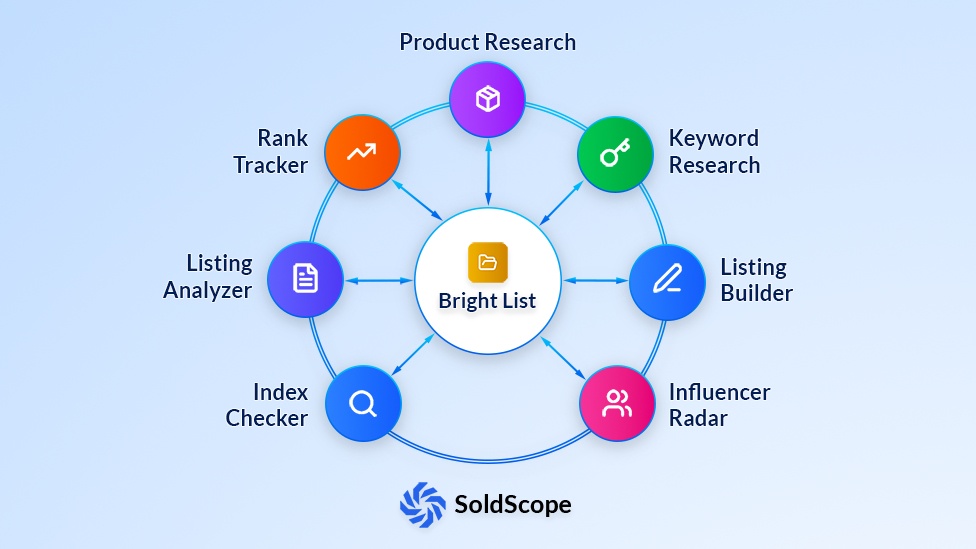
Cross-Tool Integration
Seamlessly import and export data between SoldScope tools.
Keyword Organization
Group and label keywords for easier tracking and optimization.
Product Management
Save and monitor ASINs directly from research tools.
Influencer Lists
Build and manage lists of Amazon influencers for future collaborations.
Data Transparency Notice
Get Organized in Minutes
Create Folders
Set up folders for different projects, niches, or campaigns.
Add Items
Import keywords, products, and influencers from our tools or upload your own data.
Collaborate & Export
Share with your team or export your organized data whenever you need it.
Frequently Asked Questions
Everything you need to know about Bright List
What is Bright List?
Do I need an Amazon SP-API connection to use Bright List?
How do I add items to my Bright List?
Can I organize my items?
How does Bright List connect to the other tools?
This is its most powerful feature. Bright List acts as a bridge between our tools, allowing you to pass data seamlessly:
- Step 1: Use Keyword Research to find 100 great keywords. Save them to a new list called "My Product A."
- Step 2: Go to Rank Tracker. Instead of manually typing all 100 keywords, you can simply "Import from Bright List" and select "My Product X." Tracking will begin instantly.
- Step 3: Open our Listing Builder. You can import that same list to use as a "checklist" while you write your title and bullets, ensuring you don't miss any important terms.
Can I export my Bright Lists?
Ready to Get Organized?
Start managing your research more efficiently with Bright List today.
Create Your First Folder