Create and Optimize Product Listings with AI
Write powerful titles, bullet points, and descriptions that convert. Get keyword suggestions and real-time optimization scores.
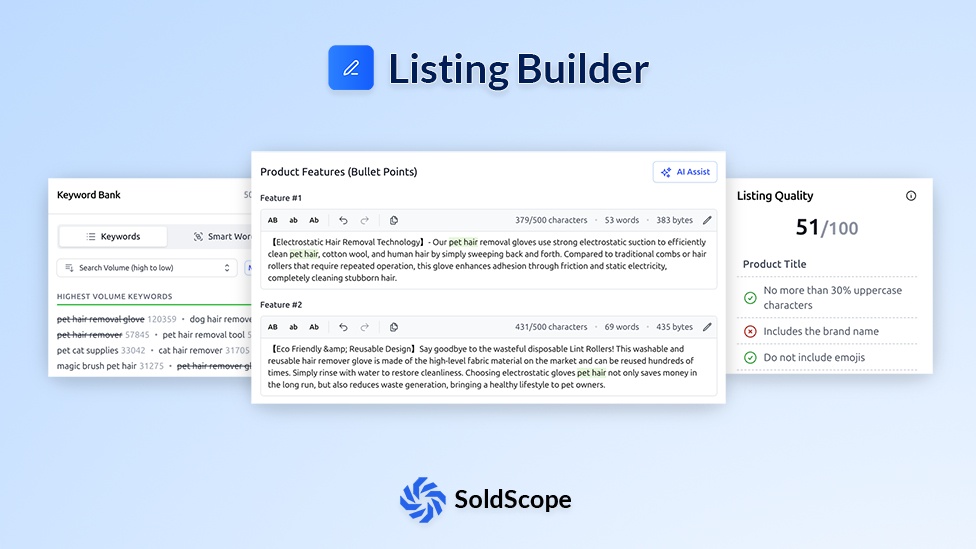
Everything You Need to Build Perfect Listings
AI-powered tools and real-time optimization to create listings that rank and convert
AI Writing Assistant
Get AI-powered suggestions for compelling titles, bullet points, and descriptions that convert.
Keyword Optimization
Real-time keyword relevance suggestions ensure your listing is optimized for Amazon search.
Real-Time Listing Score
See how optimized your listing is as you write - in real time.
Smart Keyword Counter
Instantly track keyword usage across all listing sections to ensure full coverage.
Bright List Integration
Import keyword lists directly from Bright List for seamless optimization.
Manual Editor
Full control with a user-friendly editor to craft listings exactly how you want them.
Data Transparency Notice
Build Your Listing in 3 Steps
Choose Your Method
Start from scratch, use AI assistance, or import from an existing ASIN.
Write & Optimize
Create your content with keyword suggestions and real-time SEO scoring.
Export & Launch
Export your perfected listing to Amazon and start selling.
Frequently Asked Questions
Everything you need to know about Listing Builder
What is the Listing Builder tool?
Do I need an Amazon SP-API connection to use this tool?
It's optional, but required for the main features.
- Without SP-API: You can use the tool as an advanced text editor, using the character counters and "Bright List" integration to write your copy. You must then manually copy and paste it into Seller Central.
- With SP-API: This unlocks the tool's full power. You can import your existing listing data to edit it, and publish your changes directly to Amazon's catalog.
How do I use the tool?
- Start by either creating a new, blank listing or importing an existing ASIN by connecting your SP-API.
- Write your copy in the editor, using the real-time character counters and keyword checklists.
- Once your listing is perfected, you can sync the changes directly to Amazon with the "Publish" button (SP-API connection required).
What are the main features?
- Direct Publishing: Sync your new or updated listing (Title, Bullets, etc.) directly to Amazon without ever leaving SoldScope.
- AI Assist: Suggestions for compelling titles, bullet points, and descriptions.
- Character Counters: Instantly see if your text is over limits.
- Keyword Integration: Import a Bright List folder. As you use keywords, the tool checks them off, showing you what's left.
- Keyword Density: See how many times you've used your most important keywords to avoid "keyword stuffing."
- Draft Management: Save multiple versions of your listing to test and compare different ideas.
Why shouldn't I just edit directly in Seller Central?
Efficiency and optimization. Seller Central's editor is basic. Our Listing Builder gives you:
- A keyword checklist right next to your editor.
- Live character and byte-count tracking.
- The ability to save and compare multiple drafts.
- A single, seamless workflow: find keywords in one tool, write your listing in another, and publish—all from one dashboard.
What is the best workflow for using this tool?
This tool is the final, actionable step in your optimization loop:
- Research: Use Keyword Research to find all the relevant keywords for your niche.
- Organize: Save your best keywords to a new Bright List folder.
- Write: Open the Listing Builder, import that Bright List folder, and write (or re-write) your listing.
- Publish: Connect your SP-API and use the "Publish" button to push your new, optimized listing live.
- Track: Go to Rank Tracker to monitor your rank changes after the new listing is live.
Ready to Build High-Converting Listings?
Start creating optimized product listings that rank higher and convert better on Amazon.
Create Your Listing