Amazon Research, Right in Your Browser
- Analyze any niche straight from Amazon search results
- See sales and revenue estimates on every product in the results
- Get keyword suggestions with real search volume and competition
- Open a sortable Product Radar with filters and export
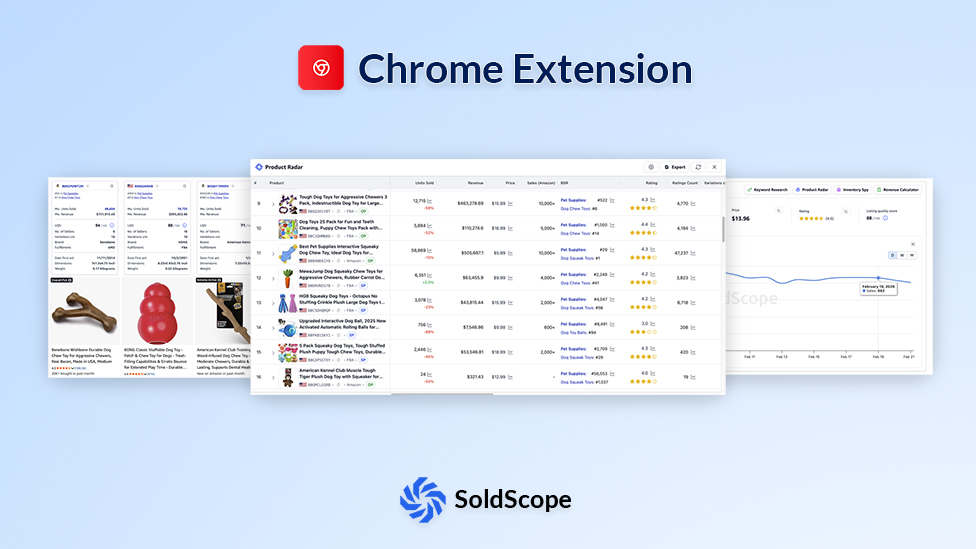
Powerful Features at Your Fingertips
Unlock a suite of research tools without ever leaving Amazon
Real-time Data Overlay
Access critical product data, including BSR, price history, and estimated sales, directly on Amazon search and product pages.
Listing Quality Score
Get an instant score on any product listing, with actionable tips on how to improve your own listings for better conversion.
Product Analysis
Quickly assess the market landscape, including estimated sales, revenue, and listing quality.
Lightweight & Fast
Optimized for speed — no lags or extra load on Amazon pages.
FBA Calculator
Estimate Amazon fees, margins, and profit directly from any product page.
Inventory Levels
Check product stock levels in real time.
Niche Overview
Turn any Amazon search results page into a clear market snapshot — demand, competition, pricing, product age, ratings, seller concentration, revenue distribution, and fulfillment for the keyword you're viewing.
Smart Autocomplete
Expand a single Amazon search into structured keyword ideas — each with search volume, trend, competing products, and title density — right inside the search bar.
Product Radar
Compare every product ranking for a keyword in one sortable table: estimated sales, revenue, price, BSR, ratings, reviews, fulfillment, and more.
Data Transparency Notice
Understand the Entire Niche at a Glance
Niche Overview turns the Amazon search results you're already looking at into a market-level dashboard. Instead of opening listings one by one, you see the size, structure, pricing, competition, and estimated revenue behind a keyword in a single view — right on the results page. Use it to judge fast whether a niche is established, concentrated around a few brands, fragmented, over-competitive, or worth a deeper look before you commit time or budget.
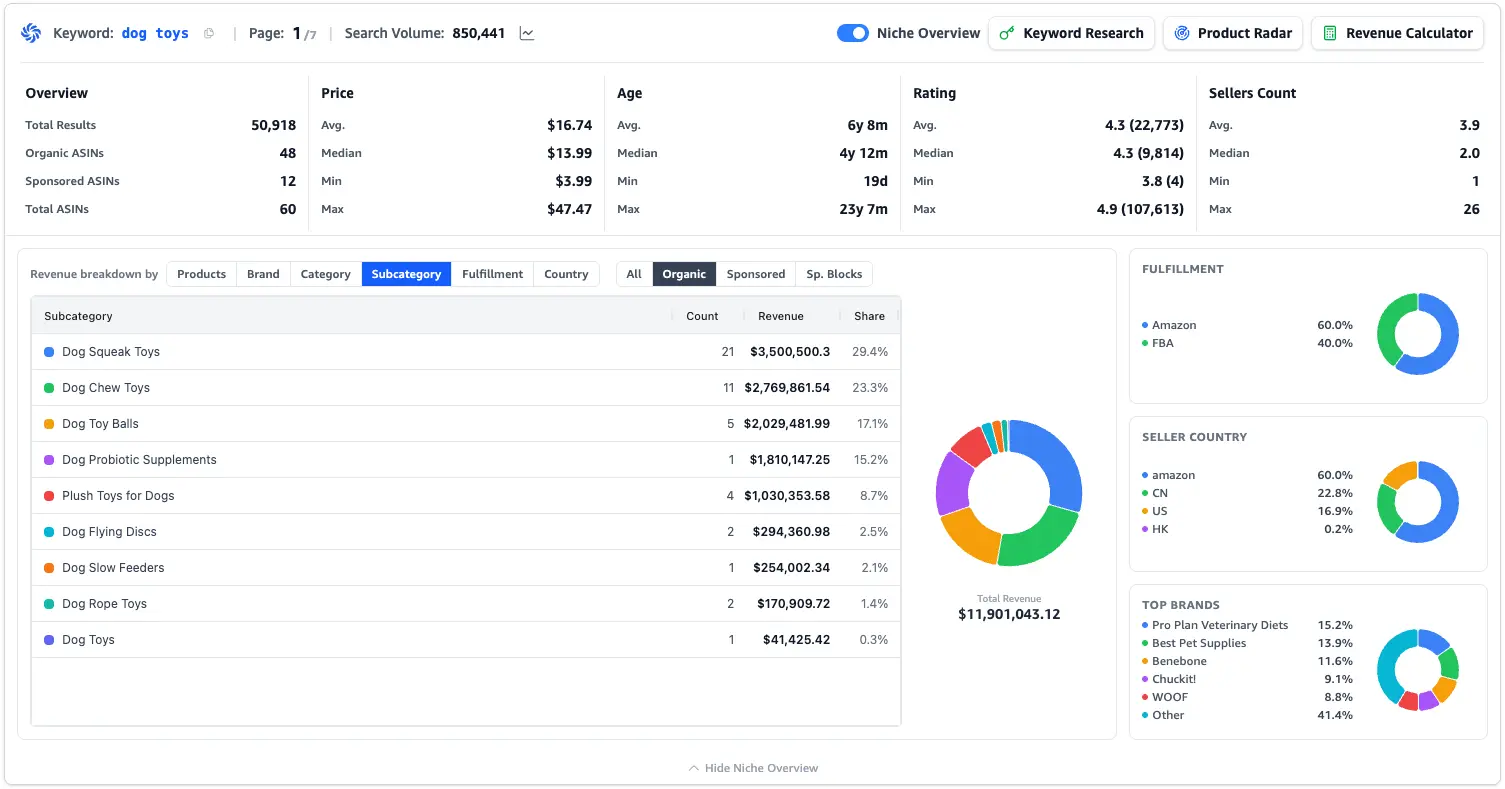
Market Size and Competition
Review total results, organic vs. sponsored ASINs, average product age, seller count, pricing spread, and rating distribution to size up the opportunity in seconds.
Revenue Breakdown
See how estimated revenue splits across products, brands, categories, subcategories, fulfillment methods, and seller countries — so you know where the money actually is.
Clear Market Structure
Spot the leading brands, the dominant fulfillment model, seller concentration, and the product groups that capture the biggest share of niche revenue.
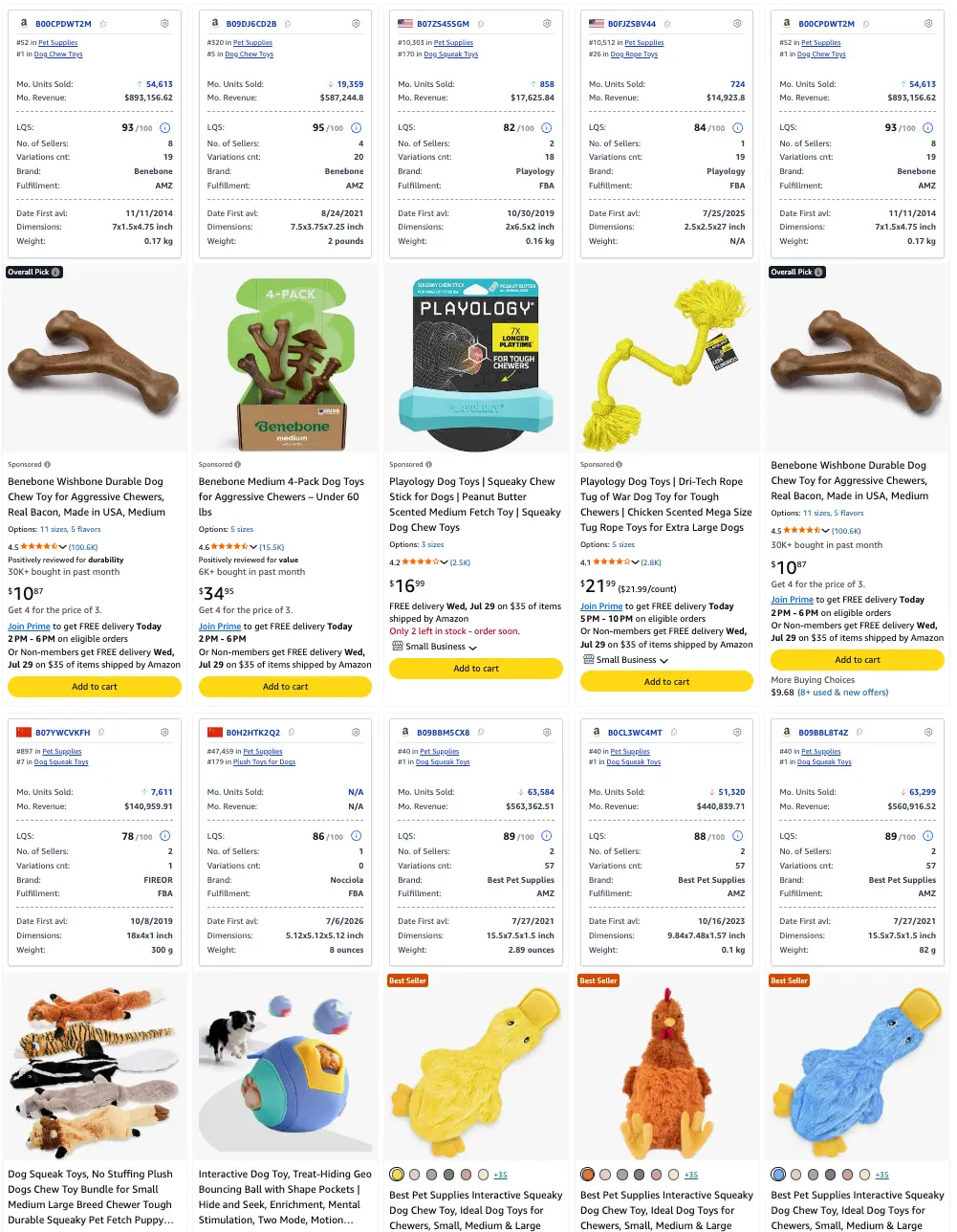
Evaluate Every Product Without Opening a Single Tab
SoldScope adds compact research widgets to each product in Amazon search results, so the numbers that matter appear before you ever open a listing. Scan the whole page, compare opportunities side by side, and spend your time only on the products worth a closer look. Each widget combines sales estimates, listing signals, competition data, and product attributes in a consistent layout across every result.
Sales and Revenue Estimates
See estimated monthly units sold and monthly revenue for each product directly in the results grid.
Competition and Listing Signals
Compare BSR, Listing Quality Score, seller count, variation count, brand, and fulfillment type at a glance.
Product Details in Context
Check dimensions, weight, first-available date, and category ranking without opening product pages one after another.
Discover More Amazon Keywords as You Type
For the deep dive into all five keyword views, use cases, and setup: Explore the Free AMZ Suggestion Expander.
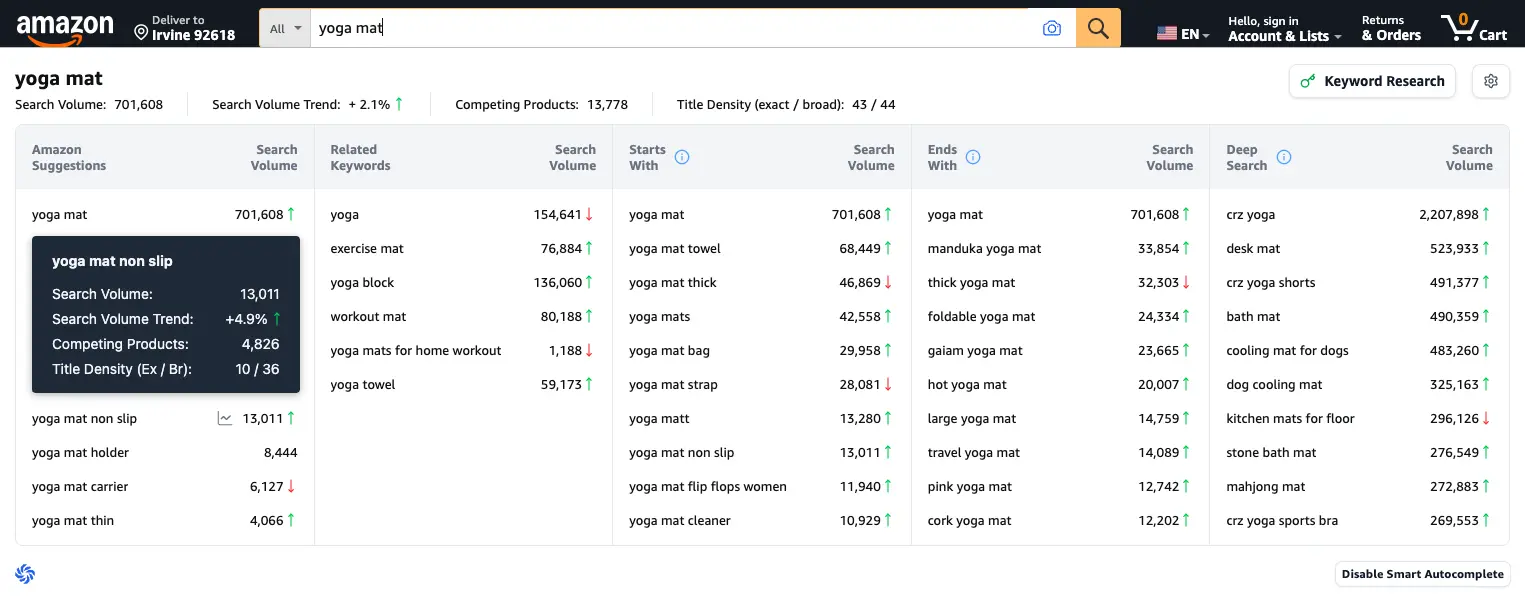
Five Keyword Discovery Views
Explore Amazon Suggestions, Related Keywords, Starts With, Ends With, and Deep Search — all inside Amazon.
Research Data for Every Keyword
Compare search volume, demand trend, competing products, and title density without switching tools.
Built Into the Free Extension
Smart Autocomplete ships with the SoldScope Chrome Extension — no separate install, no extra cost.
See the Stock Behind Every Offer
Explore the Free Amazon Inventory Checker for use cases, comparisons, and setup.
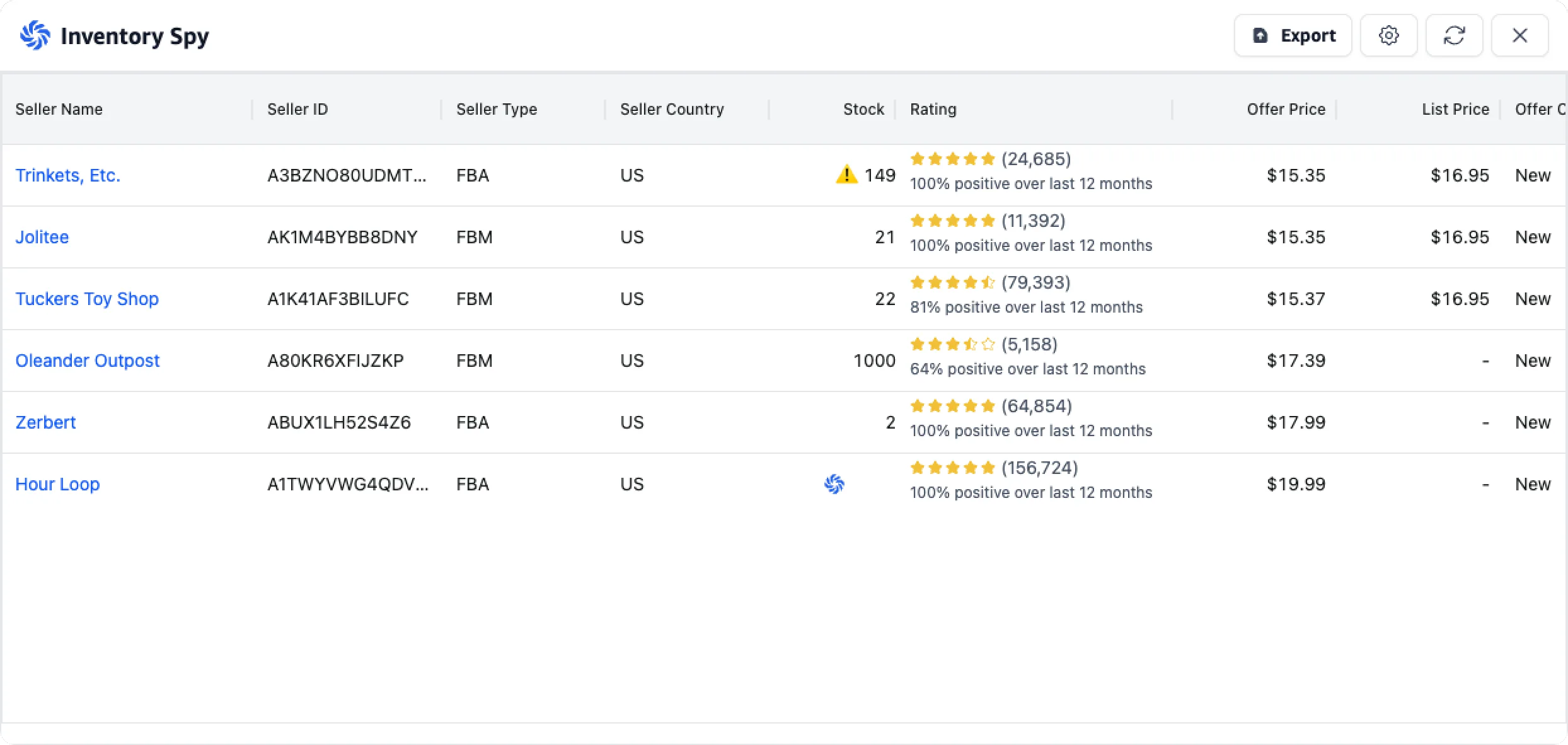
Stock for Every Offer
Remaining units behind each individual offer, with seller-set order limits flagged so a cap is never read as real inventory.
Seller Context in One Table
Seller name and ID, FBA or FBM, registered country, 12-month feedback rating, and price for every seller on the listing.
Export to CSV or Excel
One click sends the full offer table out of the browser, ready for sourcing sheets, VA workflows, or your own analysis.
Compare the Whole Market in One Product Table
Product Radar opens a structured view of every product ranking for the keyword you have open on Amazon. Instead of eyeballing listings one by one, you review the market in a sortable table and immediately see the products, price points, and performance patterns that stand out. Filter the results down to your criteria, drill into any product, and export the data when you want to keep working outside Amazon.
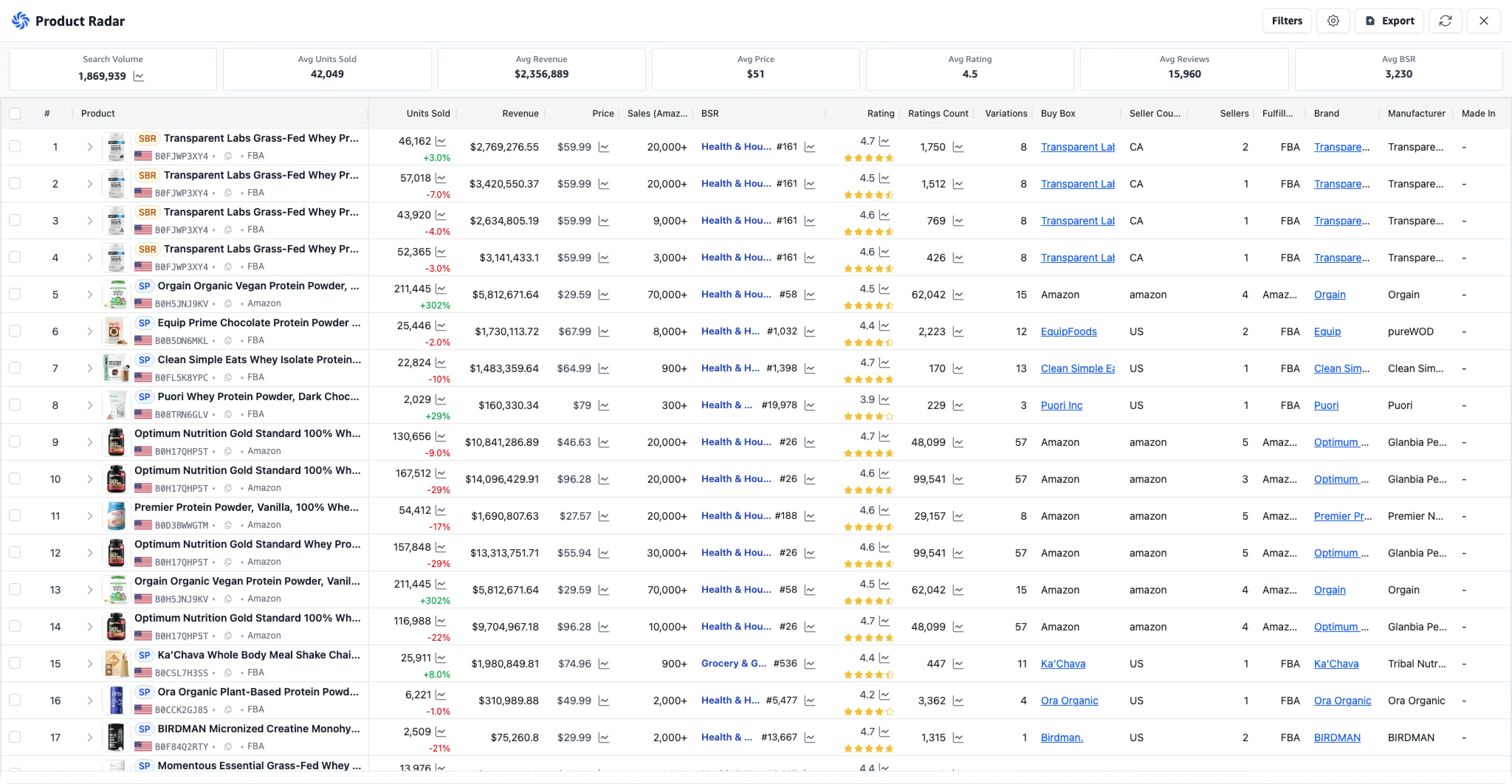
Keyword-Level Market Summary
See search volume alongside market averages for units sold, revenue, price, rating, review count, and BSR before you dig into individual products.
Side-by-Side Product Comparison
Compare estimated units sold, revenue, price, recent sales trend, BSR, ratings, reviews, variations, and fulfillment in one table.
Filters and Export
Narrow the product set to what matters, then export it for reporting, sourcing, or deeper opportunity analysis.
One Extension for the Complete Amazon Research Workflow
The SoldScope Chrome Extension ties keyword discovery, niche validation, product comparison, and listing analysis together inside the Amazon pages you already work in.
Start with Smart Autocomplete to explore keyword demand. Open Niche Overview to read the market. Scan the product widgets to compare listings, then open Product Radar when you need a structured view of the entire results page.
- Discover keyword opportunities without leaving Amazon.
- Validate niche demand, competition, and revenue distribution.
- Compare products directly in the search results.
- Open a detailed product table when you need deeper analysis.
Research Products Where the Market Actually Happens
Turn Amazon search pages into a complete research workspace with keyword data, niche insights, product metrics, and side-by-side market analysis.
Add to Chrome - It's FreeGet Started in Seconds
Install
Add the SoldScope extension to your Chrome browser from the web store.
Browse
Navigate to any Amazon search result or product detail page.
Analyze
Click the SoldScope icon to reveal in-depth analytics and insights.
Frequently Asked Questions
Everything you need to know about Chrome Extension
What is Niche Overview in the SoldScope Chrome Extension?
What data does SoldScope show on Amazon search results?
Is Smart Autocomplete included in the Chrome Extension?
Where can I learn more about Smart Autocomplete?
What is Product Radar?
Can I export data from Product Radar?
How are Niche Overview and Product Radar different?
What is the SoldScope Chrome Extension?
Do I need an Amazon SP-API connection to use the Chrome Extension?
How do I use it?
Once you install the extension from the Chrome Web Store and log in to your SoldScope account, simply go to Amazon.
- On a Search Results Page: You will see a new data bar under each product, showing its key metrics.
- On a Product Detail Page: You will see a new widget on the page summarizing that product's historical data (like Price & BSR) and other key details.
Why should I use this instead of the Product Research tool in the web app?
They have different jobs:
- Product Research (Web App): This is for deep database filtering. You use it to "Find me all products in 'Home & Kitchen' category with < 50 reviews and > $10k/mo revenue."
- Chrome Extension: This is for fast validation and browsing. You use it to "I'm just browsing Amazon, is this specific product I'm looking at any good?"
The extension isn't showing any data. How do I fix it?
Please check these simple steps:
- Make sure you are logged in to your SoldScope account.
- Click the SoldScope icon in your browser's toolbar to make sure the extension is "On."
- Make sure you are on a supported Amazon marketplace (e.g., Amazon.com, Amazon.co.uk).
- Try refreshing the page.
Ready to Supercharge Your Research?
Join Amazon sellers making smarter, data-driven decisions every day.
Add to Chrome - It's Free