Inventory Spy by SoldScope: A Free Amazon Inventory Checker
See stock, seller type, country, rating and price for every offer on an Amazon listing.
Inventory Spy is free. No credit card required.
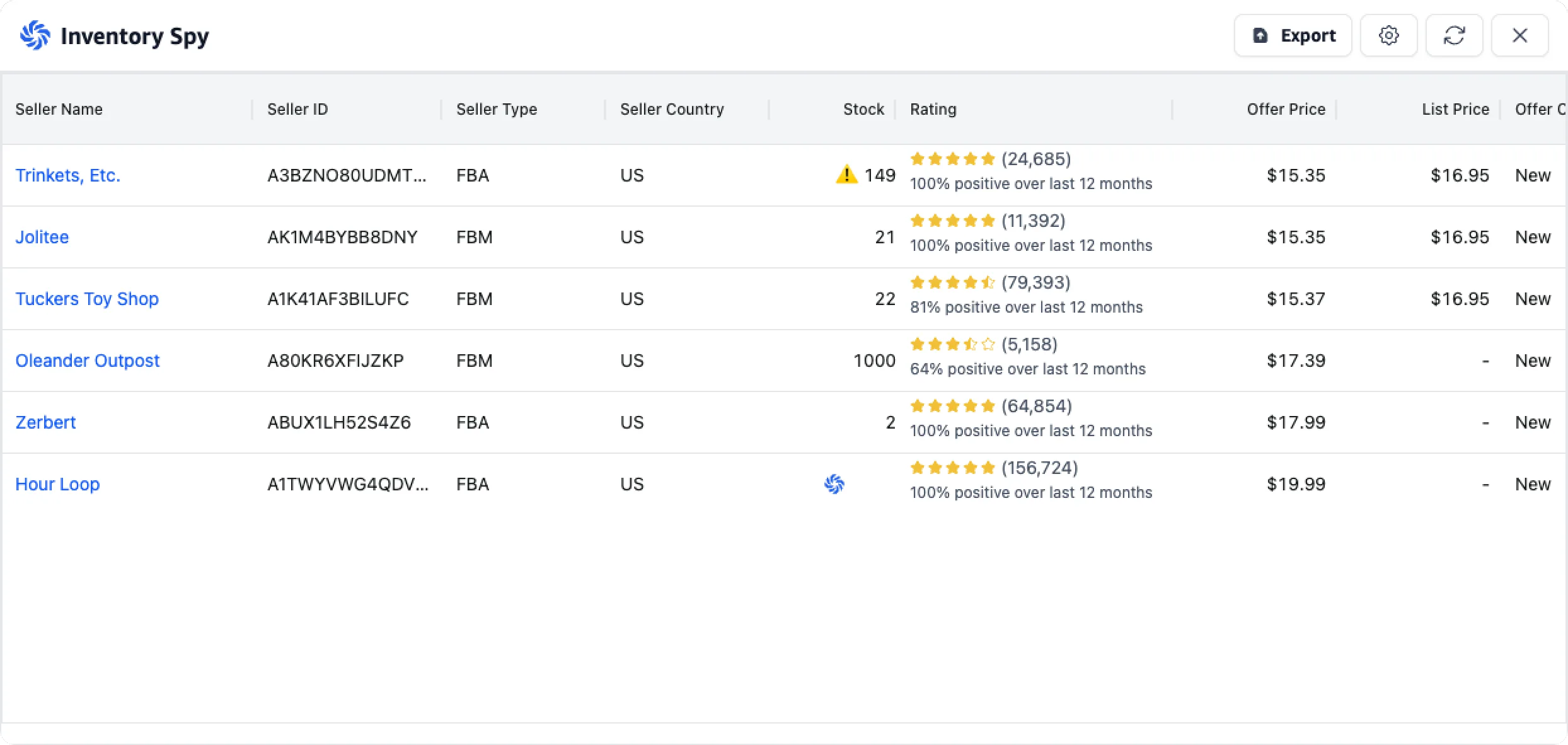
One click, and every offer on the listing opens up: who is selling, how they fulfill, and how many units they have left.
Amazon publishes offers, prices and fulfillment types, but it does not show how much inventory sits behind any of them on the standard listing page. That is the number Inventory Spy fills in, alongside the context that makes it useful: who each seller is, how they fulfill, where they are registered, what feedback they carry and what they charge.
What an Amazon Inventory Checker Does, and What It Should Cost
An Amazon inventory checker is a browser tool that shows how many units are available behind each offer on a listing. Sellers have solved this the same way for a decade, with a small stock counter extension running next to their main research tool. It works, but it means two installs, two panels, and a bare number with no context around it.
The awkward part is the pricing. Counting stock is not the hard part of Amazon research, and free tools have done it since 2012. Yet the free standalone extensions are aging out of Chrome, while the maintained versions increasingly arrive inside suites starting at $59.99 a month, or behind a paid tier of a sourcing platform you may not otherwise need.
Inventory Spy sits in SoldScope's free plan. Not a five-checks-a-day teaser, not a trial that ends in a card form. Sign in with Google and you are in, then check as many listings as you like. Our paid plans are there for the heavy work: rank tracking, bulk analytics, reimbursements.
for the full inventory checker
add to Chrome, sign in, done
on how many listings you check
Eight Columns That Turn a Stock Number Into a Decision
Most stock checkers answer one question: how many units are left? Inventory Spy answers the question you actually asked, which is whether you should buy into this listing, and that takes context.
Stock
See the units available behind each individual offer, seller by seller. Comparing stock depth across offers helps you understand whether a listing is lightly supplied or heavily stocked, even when multiple sellers show the same price.
Seller ID
View each seller's name and merchant ID, with a direct link to their storefront. Seller IDs also help identify the true number of unique sellers on a listing, since one seller may operate more than one offer.
Seller Type
See whether each offer is fulfilled by Amazon (FBA) or by the merchant (FBM). This distinction helps you compare delivery expectations, fulfillment models and likely restocking behavior across the sellers competing on the listing.
Seller Country
Check the registered business country for every seller on the listing. This adds useful context when evaluating competitors and market presence, although an FBA seller's country does not indicate the specific Amazon warehouse shipping the order.
Rating
Review each seller's feedback count and positive rating percentage for the last 12 months. This makes it easier to distinguish established, consistently rated merchants from sellers with limited history or a weaker customer-service record.
Offer & List Prices
Compare each seller's offer price with the listed price in one view. Instead of checking only the Buy Box, you can quickly read the full price ladder and see how closely competing offers are positioned.
Offer Condition
See whether every offer is new, used or another listed condition. This prevents misleading comparisons and helps you focus on the sellers and prices that are genuinely competing with your own product condition.
Export
Export the complete offer table in one click as CSV or Excel. Use the data for sourcing analysis, competitor reviews, reporting or repeatable workflows without copying values manually or relying on screenshots.
Seller Count Comes With It
Often the reason for opening a stock checker is not the stock at all. It is the seller count: how many sellers are on this listing, how many are FBA, and is Amazon one of them?
Every offer appears as its own row, already split by fulfillment type, country and feedback. Seller IDs let you collapse that into a count of unique sellers, since a single seller can list more than one offer on the same ASIN.
Get Started in Under a Minute
Install
Add the SoldScope Chrome Extension from the Chrome Web Store. Free account, no credit card.
Create a free account
Sign up in about thirty seconds, or faster with Google or another SSO option. No credit card, no trial countdown, no sales call. The same login carries your keyword research, saved lists and exports.
Open any listing and read the table
There are two ways to open Inventory Spy. One: from the extension menu, where the feature is active on any Amazon product page in the supported marketplaces (US, CA, MX, UK, DE, FR, IT, ES). Two: from the info block right on the product page, where the Inventory Spy button sits between Product Radar and Revenue Calculator. Stock, seller type, country, rating and price for every offer, in one view. Hit refresh to pull fresh numbers, or export the whole table to CSV or Excel.
Inventory Spy is one piece of the extension. The same install also gives you BSR and price history overlays, sales estimates, a profitability calculator and Smart Autocomplete on Amazon search. See everything the SoldScope Chrome Extension can do.
Five Ways Sellers Use an Amazon Stock Checker
A stock number is only as useful as the decision it drives. These are the workflows sellers run with Inventory Spy every day, from first wholesale orders to watching their own listings.
1. Size an order without guessing
Before committing to a case pack or an arbitrage buy, look at what is already on the listing. Total stock across offers, weighed against what the listing realistically sells, indicates how long current supply lasts. Buying 200 units into a listing already holding 999+ is how sourcing capital gets tied up for a year.
2. Compare readings over time for a sense of sell-through
A single reading is a snapshot. Comparing readings a few days apart gives a rough indication of sell-through, useful for sanity-checking before a large buy. Treat it as an indication rather than a measurement: restocks, new offers, returns and changes to order limits all move the numbers independently of sales. For a more precise sales estimate, use the Amazon Sales Estimator.
3. Separate real competition from noise
Ten offers can mean ten committed sellers, or two serious ones and eight holding a handful of units each. Stock depth, fulfillment type and feedback together give you a much clearer read on competitive pressure than an offer count alone. It is still a read, not a verdict: sales velocity, pricing history and your own margin decide whether a listing is worth entering.
4. Vet a wholesale deal early
Before emailing a brand or accepting a distributor's price list, check who is already on the ASIN. Whether Amazon sells it directly, whether the brand controls its own listings, and how deeply the existing sellers are stocked will often tell you enough to move on, and moving on early is the point.
5. Export for a repeatable process
Export sends the full table out as CSV or Excel, with seller IDs, stock, prices and ratings. A batch of ASINs becomes a comparable dataset instead of a folder of screenshots, which matters when a VA is checking dozens of listings a day. The same view works on ASINs you already sell, where it shows who is restocking and who is running dry.
Inventory Spy vs Other Amazon Stock Checkers
If you arrived here comparing tools, here is an honest side-by-side. All three of these are real tools with real users, and Online Seller Addon in particular has been doing this free for years.
Based on public pricing and store listings, checked July 2026.
Quick comparison
| Feature | SoldScope Inventory Spy | Online Seller Addon (OS Addon) | AMZScout Stock Stats | Seller Assistant Stock Checker |
|---|---|---|---|---|
| Price for this feature | Free | Free | Free trial, then AMZScout AI Bundle from $59.99/mo | Paid only, from $29.99/mo |
| Chrome support | Manifest V3 | Store listing states Chrome no longer supports its Manifest version and points users to Firefox | ||
| Stock per individual seller | ||||
| Flags seller-set order limits (max qty per customer) | — | — | — | |
| Usage limits on the free tier | Unlimited | None | ~20 checks/day | No free tier |
If you are coming from OS Addon. Its Chrome Web Store listing states that it runs on a Manifest version Chrome no longer supports, and points users to the Firefox build. That is Google's platform migration rather than a judgment on the tool. If you are installing something new anyway, Inventory Spy adds seller type, country, feedback, price and export on Manifest V3.
If you are coming from AMZScout Stock Stats or Seller Assistant. Both are mature tools, and the difference is packaging rather than data. Stock Stats offers a free trial limited to about 20 searches a day, after which it runs through the AMZScout AI Bundle starting at $59.99 a month. Seller Assistant's Stock Checker is a feature of a paid sourcing platform with no free tier, plans starting at $29.99 a month, which makes sense inside that workflow and less sense if you only need the stock number. Inventory Spy has no daily cap on this feature, so you can check dozens or hundreds of listings a day without hitting a wall.
Frequently Asked Questions
Everything you need to know about Inventory Spy
How do I check competitor stock on Amazon?
Is Inventory Spy free?
How accurate are the stock numbers?
Why does a stock number sometimes have a warning icon next to it?
Does it show FBA and FBM sellers separately?
Which Amazon marketplaces are supported?
Is this the same tool as the Inventory Spy Chrome extension?
Can I export the data?
Do I need to connect my Amazon seller account?
Will it affect my Amazon browsing?
See the Whole Listing, Not Just the Price
Install the free SoldScope extension, open any Amazon listing, and see the stock behind every offer along with the sellers, ratings and prices around it.
Inventory Spy reads publicly available offer data from Amazon listing pages. Where a seller has set a maximum order quantity per customer, the figure shown reflects that limit rather than the seller's total inventory, and those offers are flagged in the table. Details about third-party tools mentioned on this page are taken from their official store listings and pricing pages and are accurate as of July 2026.