Free Amazon Suggestion Expander with Search Volume
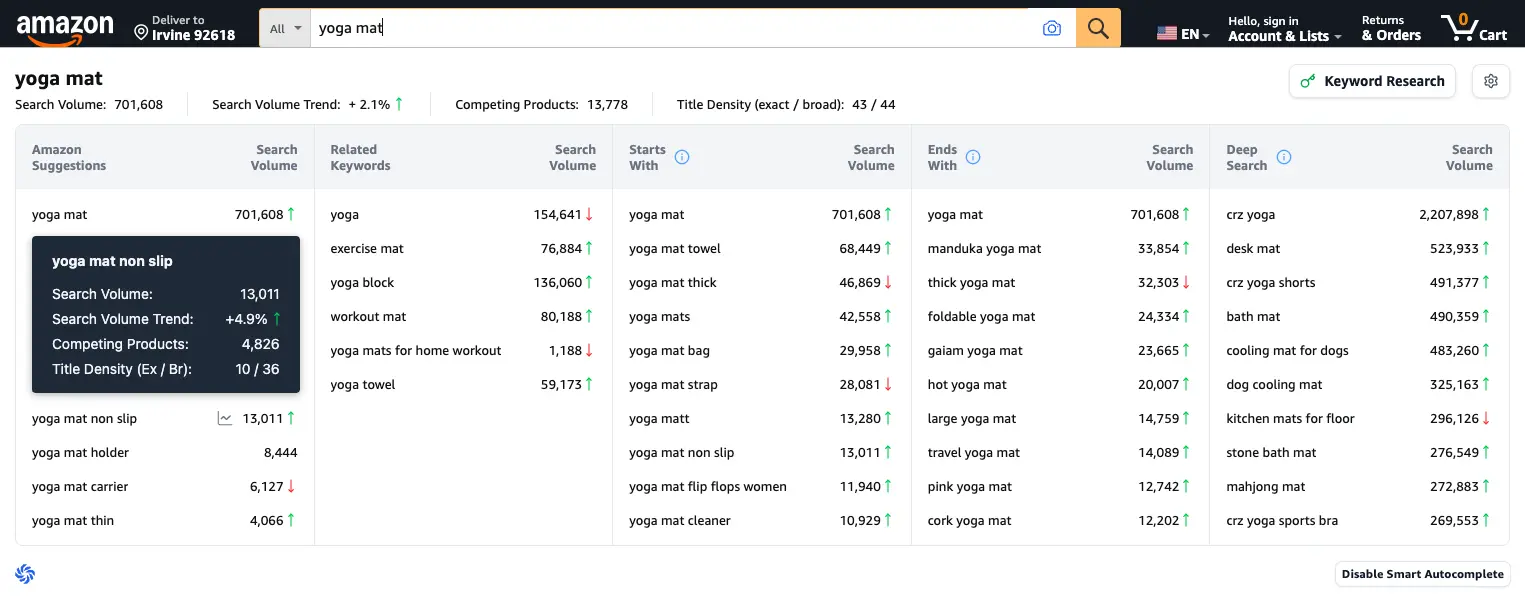
Smart Autocomplete in action: one search for "yoga mat" surfaces 40+ keyword ideas across five panels, before you even press Enter.
Type a keyword into the Amazon search bar and instantly see an expanded panel of suggestions, complete with search volume, trends, competing products, and title density for every keyword. It is the AMZ suggestion expander you have been looking for, just faster, deeper, and genuinely free.
No one-time fees, no monthly plans, no credit card
What Is an Amazon Suggestion Expander?
Amazon's search bar only shows you about ten autocomplete suggestions at a time, a tiny slice of what shoppers actually type. A suggestion expander removes that limit. It pulls the full set of Amazon's own autocomplete data and lays it out in front of you: what people search before your keyword, after it, around it, and instead of it.
Tools like AMZ Suggestion Expander made this technique popular, and big research suites later added their own versions of it. SoldScope's Smart Autocomplete takes the idea further: instead of a plain list of suggestions, you get a live research panel directly inside the Amazon search bar, with search volume, volume trends, competing product counts, and title density for every keyword. No tab switching, no exports just to see the numbers, and no paywall in front of the feature.
A Simple Feature Shouldn't Cost You Anything
Suggestion expanders are not complicated tools. They read Amazon's own autocomplete and show you more of it. Yet somehow the market has decided you should pay for that: standalone expanders charge one-time fees for their "Pro" versions, and other amazon research suites bundle their expander into subscriptions that start at $39 a month, with daily limits on free accounts.
We think that's backwards. At SoldScope, Smart Autocomplete is fully included in the free plan. Not a trial, not a teaser with three searches a day, not the first step of an upsell funnel. Our paid plans exist for heavy-duty work like bulk analytics, rank tracking, and reimbursements. Expanding search suggestions is something every seller should simply have.
for the full suggestion expander
required at signup
no daily teaser limits on this feature
Five Keyword Panels, Real Data on Every Keyword
Each search expands into five live panels, and every keyword inside them already ships with its own metrics - the same data you would normally dig for across multiple tools.
Amazon Suggestions
The classic suggestion expander view: Amazon's full autocomplete list for your seed keyword, each entry with monthly search volume and a trend arrow.
Related Keywords
Semantically connected terms shoppers use for the same need, phrases a basic amz keyword expander would never show you, like "yoga block" or "exercise mat" for a "yoga mat" search.
Starts With
Every popular query that begins with your keyword. Perfect for mapping long-tail demand like "yoga mat towel" (68,449 searches a month).
Ends With
Queries that end with your keyword, modifier-first searches like "thick yoga mat" or "foldable yoga mat" that reveal how buyers actually describe products.
Deep Search
A wide sweep of the broader niche around your term. This is where you catch adjacent markets and category-level demand you didn't know existed.
Per-Keyword Metrics
Every keyword in every panel ships with its own data: monthly search volume, a trend, competing product count, and title density (exact / broad).
Every Keyword Comes With Real Data, Not Just a List
Most Amazon expander extensions stop at showing you more suggestions. That's step one. The real question is: which of these keywords deserve your attention?
Hover over any keyword in Smart Autocomplete and you'll see:
- Search Volume. Calculated by the same model that powers the full SoldScope Keyword Research platform, and one of the most accurate volume estimates on the market.
- Search Volume Trend. Is demand for this keyword growing or fading? A +4.8% trend tells a very different story than a -12% one.
- Competing Products. How many listings you're up against for this exact term.
- Title Density (Exact / Broad). How many competitors already use this keyword in their titles. Low title density plus high volume equals your ranking opportunity.
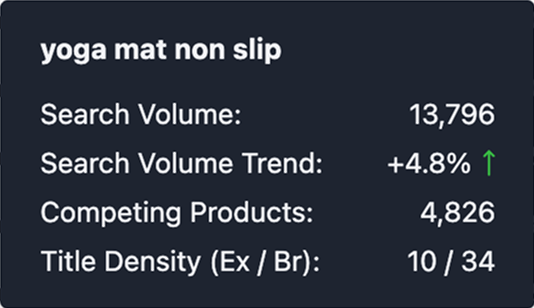
"yoga mat non slip": 13,796 searches, growing at +4.8%, with 4,826 competing products and title density of 10 exact / 34 broad. That is a gap worth investigating.
Get Started in Under a Minute
Install
Add the SoldScope Chrome Extension from the Chrome Web Store. Free account, no credit card.
Search
Go to Amazon and start typing in the search bar. Smart Autocomplete expands automatically as you type.
Research
Hover any keyword for volume, trend, and competition data. Found a winner? Jump straight into full Keyword Research with one click. Just shopping today? Hit "Disable Smart Autocomplete" and the panel disappears.
By the way, Smart Autocomplete is just one part of the extension. The same install also gives you BSR and price history overlays, sales estimates, a profitability calculator, and competitor stock levels, right on Amazon pages.
8 Ways Sellers Use the Suggestion Expander Every Day
An Amazon expander is only as useful as the decisions it drives. These are the workflows we see most often among SoldScope users, from first-time private label sellers to wholesale veterans.
1. Validate a niche before spending a dollar on inventory
Before you order samples or contact suppliers, type your product idea into Amazon and read the room. If the Starts With panel fills up with specific, high-volume variations ("yoga mat towel" at 68,449 searches a month, "yoga mat thick" at 46,869), demand is real and segmented, which usually means room for a differentiated product. If the panels come back thin, the niche probably is too. Autocomplete is built from real shopper behavior, so this is demand validation straight from the source, not from a survey or a hunch.
2. Build the keyword list for a new listing in minutes, not hours
Every new listing needs the same foundation: head terms for the title, mid-tail phrases for the bullets, and everything else packed into the 249-byte backend search terms field. Normally that means hours of brainstorming seed keywords and testing them one by one. With the expander, a single seed keyword fans out into dozens of real search phrases across five panels, each already scored by volume. Shortlist the relevant ones, push them into Keyword Research, and your listing draft has a data-backed keyword map on day one.
3. Find title keywords your competitors ignore
This is where Title Density turns the expander from a list into a strategy. Sort your candidates by the ratio of search volume to exact title density. High volume with low exact density is the classic Amazon SEO gap: shoppers search the phrase constantly, but relatively few listings target it word for word. In our "yoga mat" example, "yoga mat non slip" pulls 13,011 monthly searches while only 10 titles use the exact phrase, with broad title density of 36. Slot a keyword like that into your title and bullets before the niche catches up.
4. Feed your PPC campaigns with proven search terms
Autocomplete keywords come from real queries, which makes them strong exact-match candidates for Sponsored Products. Many sellers run new autocomplete finds in exact-match campaigns first, let real click and conversion data pick the winners, and only then work those terms into the organic listing. The Ends With panel is especially useful here: modifiers like "thick," "foldable," "hot," and "travel" map cleanly onto ad groups, and irrelevant modifiers you spot become negative keywords before they waste a cent of budget.
5. Catch trends and seasonality before your competitors do
The trend arrow next to each keyword is a miniature market report. In our example, the head term "yoga mat" is growing at +2.1% while "yoga mat non slip" is rising faster at +4.9%. That divergence is a signal: non-slip positioning is gaining demand faster than the category overall. Sellers who watch these arrows adjust earlier, whether that means refining product features, updating a main image, or shifting ad spend toward the rising phrase while it is still cheap.
6. Discover variations, bundles, and your next product
Suggestion data doubles as a product ideation tool. When "yoga mat towel," "yoga mat bag," and "yoga mat strap" all show up with solid volume, that is the market telling you which accessories and bundle combinations shoppers want. Wholesale and bundle sellers use the expander the same way: scan a brand or category keyword, see which combinations shoppers actually search for, and build offers around proven demand instead of guessing at assortments.
7. Learn the exact language your customers speak
Shoppers rarely describe products the way manufacturers do. The expander shows you their words: where the product will be used ("for home workout," "travel," "hot yoga"), what problem it solves ("non slip"), and which attributes matter ("thick," "foldable," "cork," "pink"). That language belongs everywhere buyers see you: titles, bullet points, A+ content, even the scenarios you show in your image stack. Listings written in customer language convert better because shoppers instantly recognize themselves in them.
8. Research any marketplace in its own language
Selling in Germany, France, or Mexico? Autocomplete is localized, and so is Smart Autocomplete. You see the suggestions and search volume for the marketplace you are actually browsing, not English-only estimates projected onto other regions. That makes the expander a fast reality check when you localize listings: the literal translation of your main keyword is often not what local shoppers type, and the panels show you what they type instead.
SoldScope vs AMZ Suggestion Expander Pro
If you found this page while searching for the AMZ Suggestion Expander Pro Chrome extension, here is an honest side-by-side. ASE is a solid single-purpose tool and deserves credit for popularizing suggestion expansion. Here is what's different:
Quick comparison
Based on current public pricing and plan pages
| Feature | SoldScope Smart Autocomplete | AMZ Suggestion Expander Pro |
|---|---|---|
| Price for this feature | Free (included in the free plan) | $9.97 for the Pro version |
| Expanded autocomplete suggestions | ||
| "Starts with" / "Ends with" expansion | Yes (before/after keywords) | |
| Search volume on every keyword | Yes - localized for each supported marketplace | English keywords only |
| Search volume trend | — | |
| Competing products count | — | |
| Title density (exact / broad) | — | |
| Related keywords panel | Common words list | |
| One click into a full research suite | Keyword Research, Listing Analyzer, Product Research | — |
And to be fair to ASE: their Excel export with word-frequency analysis is a nice touch. In SoldScope, you get the equivalent and more by sending any keyword into the full Keyword Research tool with a free account, including word frequency, historical volume, and exports.
Frequently Asked Questions
Everything you need to know about the AMZ Suggestion Expander
What is an AMZ suggestion expander?
Is SoldScope's suggestion expander really free?
How do I download the AMZ suggestion expander Chrome extension?
I was looking for AMZ Suggestion Expander Pro. Is this the same tool?
Where does the search volume data come from?
What is Title Density and why should I care?
How many keywords can I actually get from one search?
Which Amazon marketplaces are supported?
Will it slow down my Amazon browsing?
Can I export the keywords?
Stop Squinting at Ten Suggestions
Amazon already tells you what shoppers want. You just need to see all of it. Install the free SoldScope extension, type one keyword, and watch your niche open up. And when you're ready for more, the same extension packs a full research toolkit for Amazon sellers.
Suggestion data is sourced from publicly available Amazon autocomplete results. Search volume, trend, and competition metrics are generated by SoldScope's search volume model and continuously monitored against live marketplace conditions. Details about third-party tools mentioned on this page are taken from their official websites and are accurate as of the last update.