How to Find Amazon Influencers and Their Storefronts

Olivia Reyes
The Amazon Influencer Program has changed the rules of e-commerce. Content creators are no longer just people with cameras; they are powerful sales channels capable of driving your product to the top of its category. But for sellers, the main challenge remains: Where do you find them?
In this guide, we will explore the classic (manual) methods of finding influencers and show you how to cut this process down from days to just 5 minutes using specialized automation tools.
What is an Amazon Storefront?
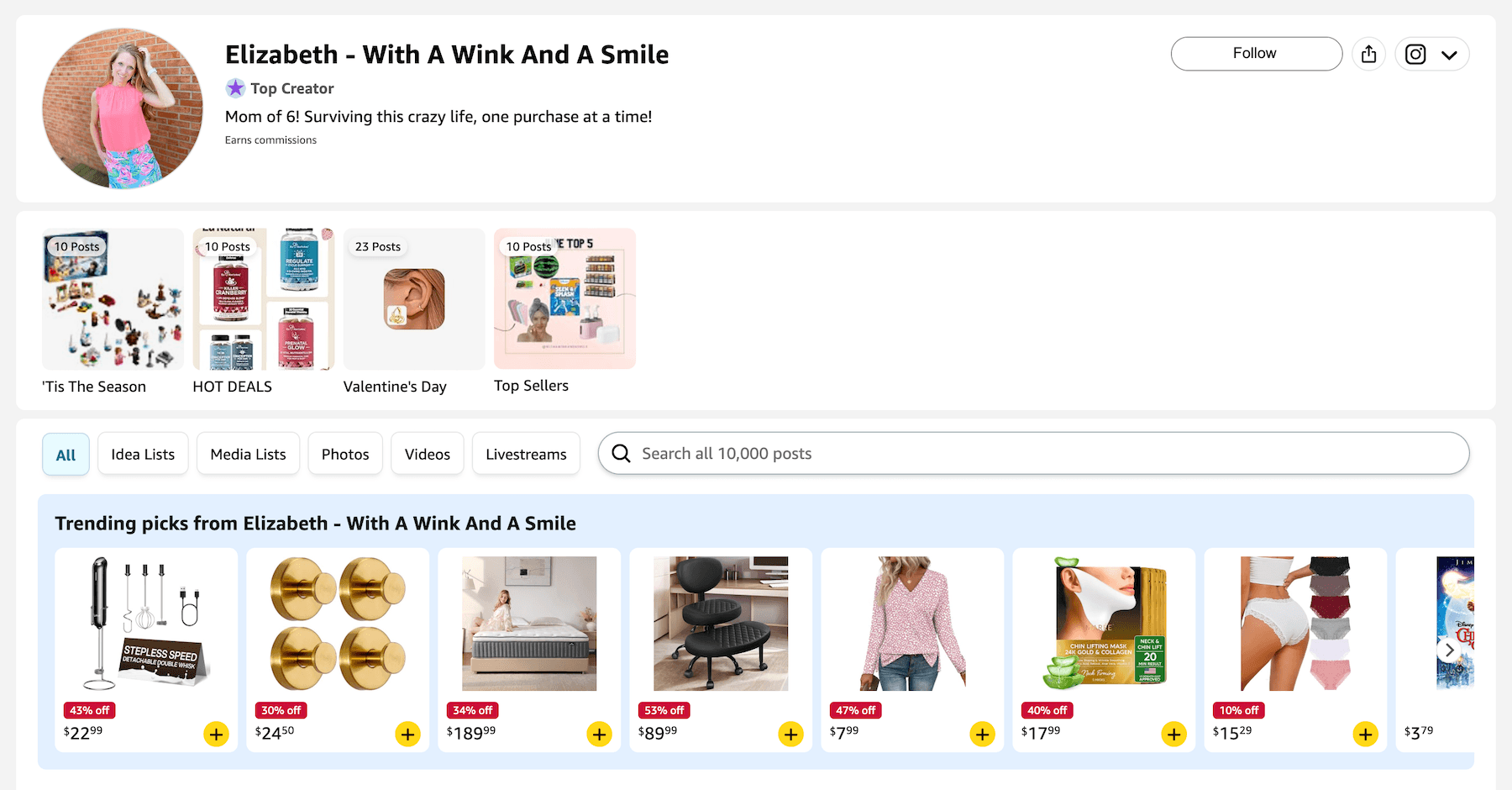
Before searching for influencers, it is crucial to understand where they send their traffic. An Amazon Storefront is the influencer’s personal curated shop within Amazon. It is a dedicated page where they publish product collections, video reviews, photos, and Idea Lists.
Why does this matter for sellers? When an influencer drives traffic from TikTok or Instagram, they direct it to their Storefront. If your product is featured in their "Best Kitchen Gadgets" list, you receive high-intent traffic that is already primed to buy thanks to their recommendation.
Method 1: The Manual Search (The Hard Way)
If you are not using automation tools, you have to search for influencers "in the wild." Here are three classic methods:
1. Social Media Hashtags
Search TikTok, Instagram, and YouTube for tags like: #AmazonFinds, #AmazonMustHaves, #FoundItOnAmazon.
The Challenge: You will find thousands of bloggers, but 90% of them might not be enrolled in the Amazon Influencer Program (meaning their videos won't appear on your listing). Verifying every profile takes hours.
2. Browsing Amazon Live
Navigate to amazon.com/live. Here, influencers host livestreams demonstrating products.
The Challenge: You have to sit and watch streams to determine if the host fits your niche. Finding their contact information through the Amazon Live interface is nearly impossible.
3. Competitor Listing Analysis (Spying)
Go to the product pages of best-selling competitors in your niche. Scroll down to the "Videos for this product" section. Click on the videos and check the author's name. If it is a person (not a brand) and they have a clickable profile—that is an influencer.
The Challenge: This is the most reliable manual method, but it requires clicking through hundreds of videos. You cannot see the influencer's performance stats, and you won't see their email address.
Method 2: Automatic Search via SoldScope (The Smart Way)
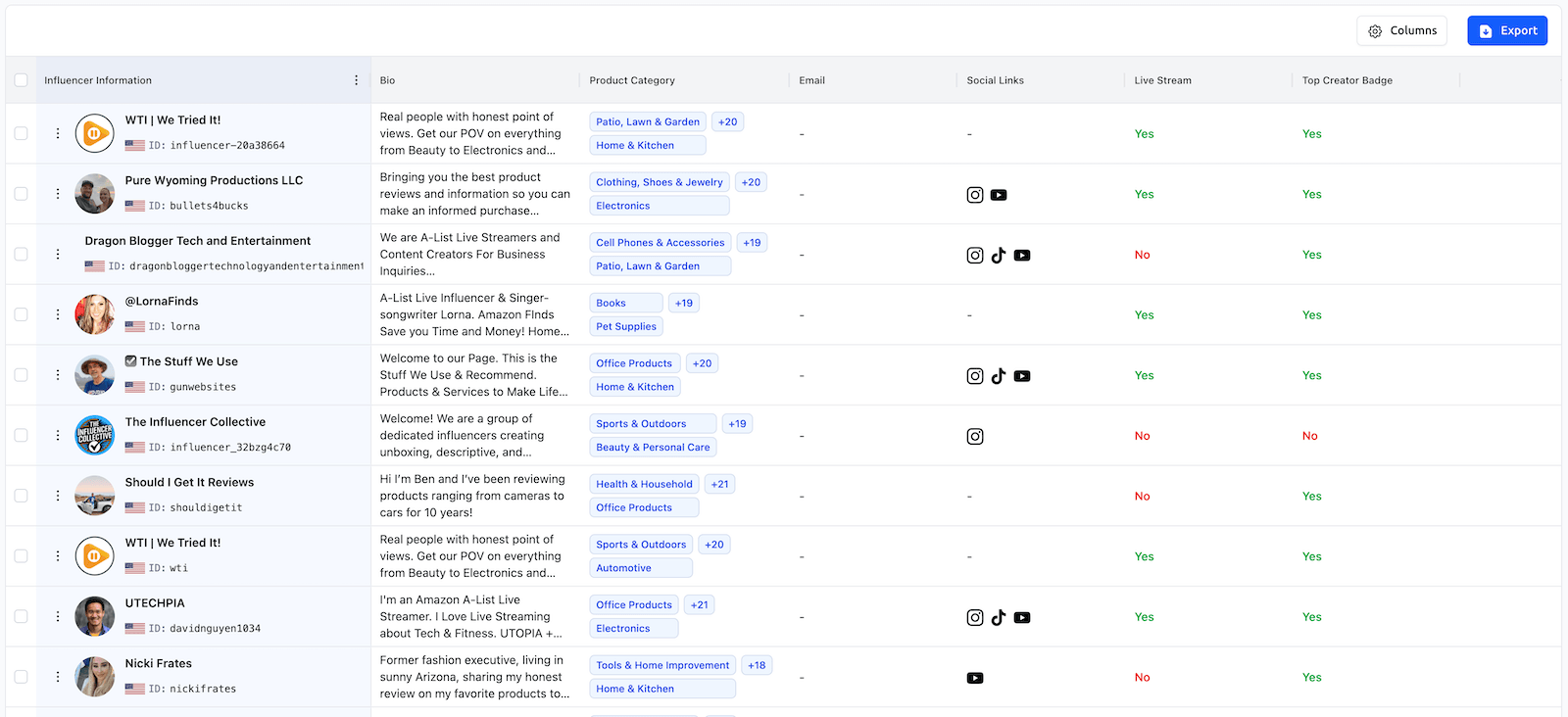
Why spend hours on manual research when SoldScope Influencer Radar can do it in seconds, providing data that is invisible to the naked eye?
Influencer Radar doesn't just find people with accounts. It scans the Amazon ecosystem to identify creators who are already driving sales in your niche.
Why use Influencer Radar?
Search by Competitors (Target ASINs): Instead of manually checking listings, simply paste up to 20 competitor ASINs. The tool instantly generates a list of all influencers who have created videos for these specific products. You immediately see who is active in your category.
The "Upper Carousel" Filter: Manually, you cannot judge an influencer's effectiveness. SoldScope reveals the Upper Carousel Video Count metric—how many of their videos made it to the main product image gallery. This is the ultimate badge of quality.
Instant Contact Info: Forget hunting for emails in bio sections. The Email exists filter allows you to see only those creators whose contact details are already in our database.
How it works:
Open Influencer Radar.
Select a Category or enter Competitor ASINs.
Filter by "Email exists" and activity metrics (Videos Posted).
Save your list of ideal candidates.
Step-by-Step Guide: For a deep dive into all filters and metrics, read the Influencer Radar Overview article.
How to Evaluate an Influencer's Storefront?
Once you have found an influencer (manually or via SoldScope), you must evaluate their Storefront before reaching out.
Go to the influencer’s profile on Amazon.
Click the "Earns Commissions" or "Shop [Name]'s Store" button.
What to look for:
Aesthetics: Do their photos and videos match your brand's style?
Idea Lists: Do they create curated lists (e.g., "Summer Essentials")? Getting into these lists provides long-term evergreen traffic.
Engagement: Do they hold a "Top Creator" or "Insider" badge?
Conclusion
Finding influencers manually is like looking for a needle in a haystack. You might find a creator, but you won't know if they are effective on Amazon.
By using SoldScope Influencer Radar, you skip the guessing game and instantly access a list of professionals whose videos are proven to land on product pages.
Ready to start? Head over to the Influencer Radar Overview to learn how to set up your first search and capture new audiences.