Understanding the Results Page

Olivia Reyes
Overview cards (top summary)

At the top of the page, you’ll see summary cards that show the current state of your reimbursements:
Unprocessed Items
Items that are eligible for reimbursement but have not been handled by you yet.Pending Items
Items for which you have already submitted a request to Amazon. These cases are monitored daily.Reimbursed Items
Items for which Amazon has confirmed a reimbursement.Expired Items
Items that passed the 60-day claim window and are no longer eligible for reimbursement.
Each card also shows the related monetary value so you can quickly understand the financial impact.
Case lifecycle and statuses
Each case on the results page follows a clear lifecycle:
Unprocessed
The case is eligible and ready for you to review and submit to Amazon.Pending
After you submit a request to Amazon, the case moves to pending.
Reimbursement Service checks its status daily.Reimbursed
If Amazon confirms that reimbursement was issued, the case is marked as reimbursed.Expired
If 60 days pass from the incident date and no reimbursement is issued, the case becomes expired and can no longer be claimed.
This flow helps you always understand what stage each case is in and what action (if any) is required.
Case type and marketplace tabs

Below the summary cards, you’ll find tabs that let you filter results:
Case type tabs
Lost items
Damaged items
Marketplace tabs
Each marketplace (for example: US, CA, MX) is shown separately
Only tabs that contain actual cases are displayed. This keeps the interface clean and focused on relevant data.
Results table explained
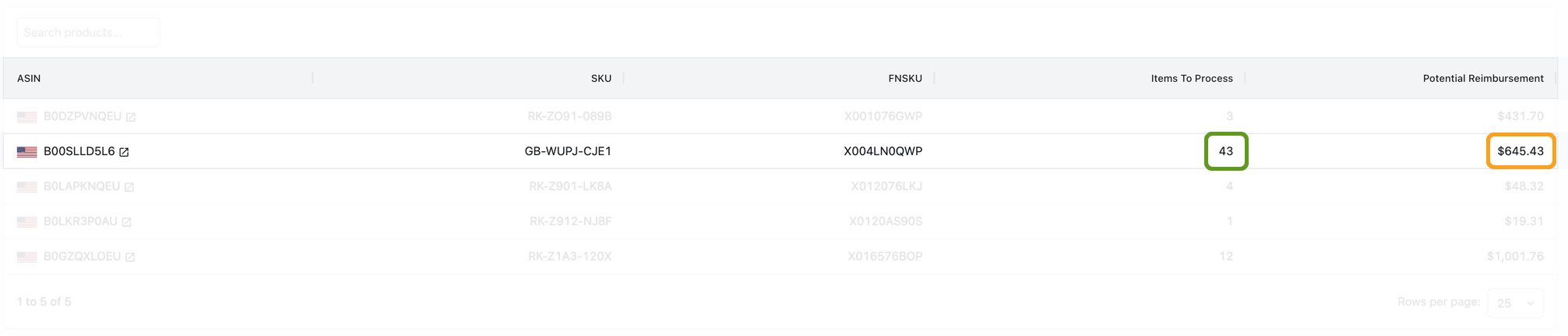
The results table shows detailed information about each reimbursement case.
Key points to understand:
Cases are grouped by SKU
Multiple affected units for the same SKU are combined into a single row.Items To Process (highlighted in green)
Shows how many units are included in the case.Potential Reimbursement (highlighted in orange)
Shows the estimated amount you may be able to recover for that case.ASIN, SKU, FNSKU
Help you clearly identify the affected product.
This grouping makes it easier to work with multiple units without handling each item individually.
Opening a case and next steps
When you click on a row in the table:
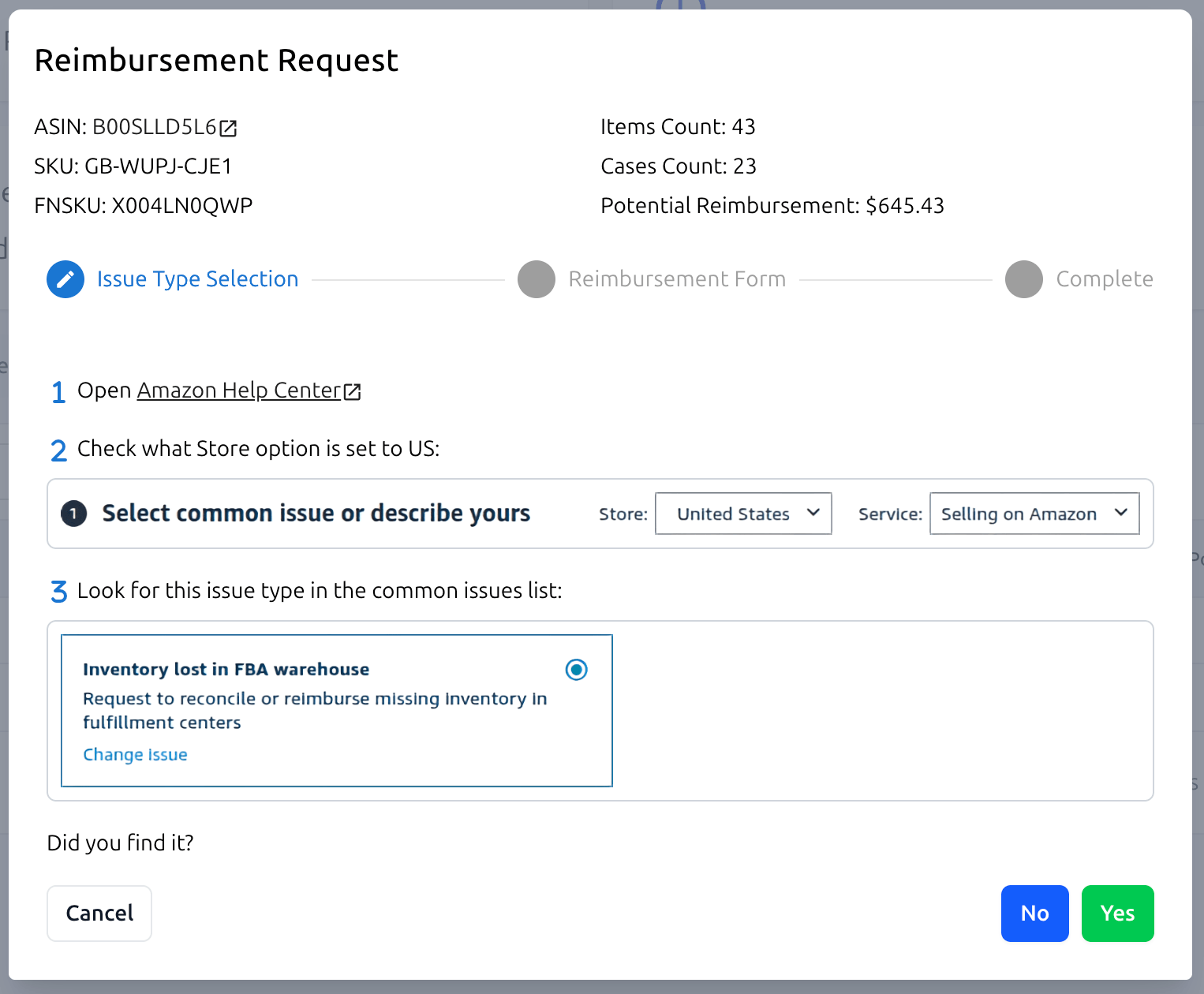
A wizard with step-by-step instructions opens
You see exactly how to submit the reimbursement request in Amazon Seller Central
All necessary information and calculations are provided in one place
Reimbursement Service does not submit cases for you — instead, it guides you through the correct process so you can act confidently.
How to use the results page effectively
Start with Unprocessed Items to avoid missing active reimbursement opportunities
Regularly check Pending Items to track Amazon responses
Use Reimbursed Items to understand recovered value
Review Expired Items to learn where opportunities were missed
The results page is designed to give you full visibility and control, without complexity or guesswork.