Listing Analyzer & Bright List: Seamlessly Auditing Your Strategy

Olivia Reyes
Efficiency is the cornerstone of a successful Amazon business. The integration between Bright List and the Listing Analyzer allows you to move from the research phase to a deep audit without the friction of manual data entry. By using Bright List as a data bridge, you can instantly pull your curated competitor ASINs or your own product lists directly into the analysis engine.
Why Use This Integration?
Eliminate Manual Entry: Stop hunting for ASINs in various tabs or spreadsheets; pull them directly from your organized folders.
Speed Up Benchmarking: Quickly compare your product against a pre-selected list of top-performing rivals.
Organized Auditing: Keep your audits grouped by project, marketplace, or niche as defined in your Bright List collections.
How to Use the Integration
Using your saved Bright List collections to power an audit is designed to be an intuitive, three-step process.
Step 1: Open the Listing Analyzer
Navigate to the Listing Analyzer tool within the SoldScope platform. You will see the standard input fields for your "Main ASIN" and "Competitor ASINs".
Step 2: Trigger the Import

Instead of typing or pasting ASINs, look for the Insert from Bright List button located next to the competitor input field. Clicking this will open the integration portal.
Step 3: Select and Analyze
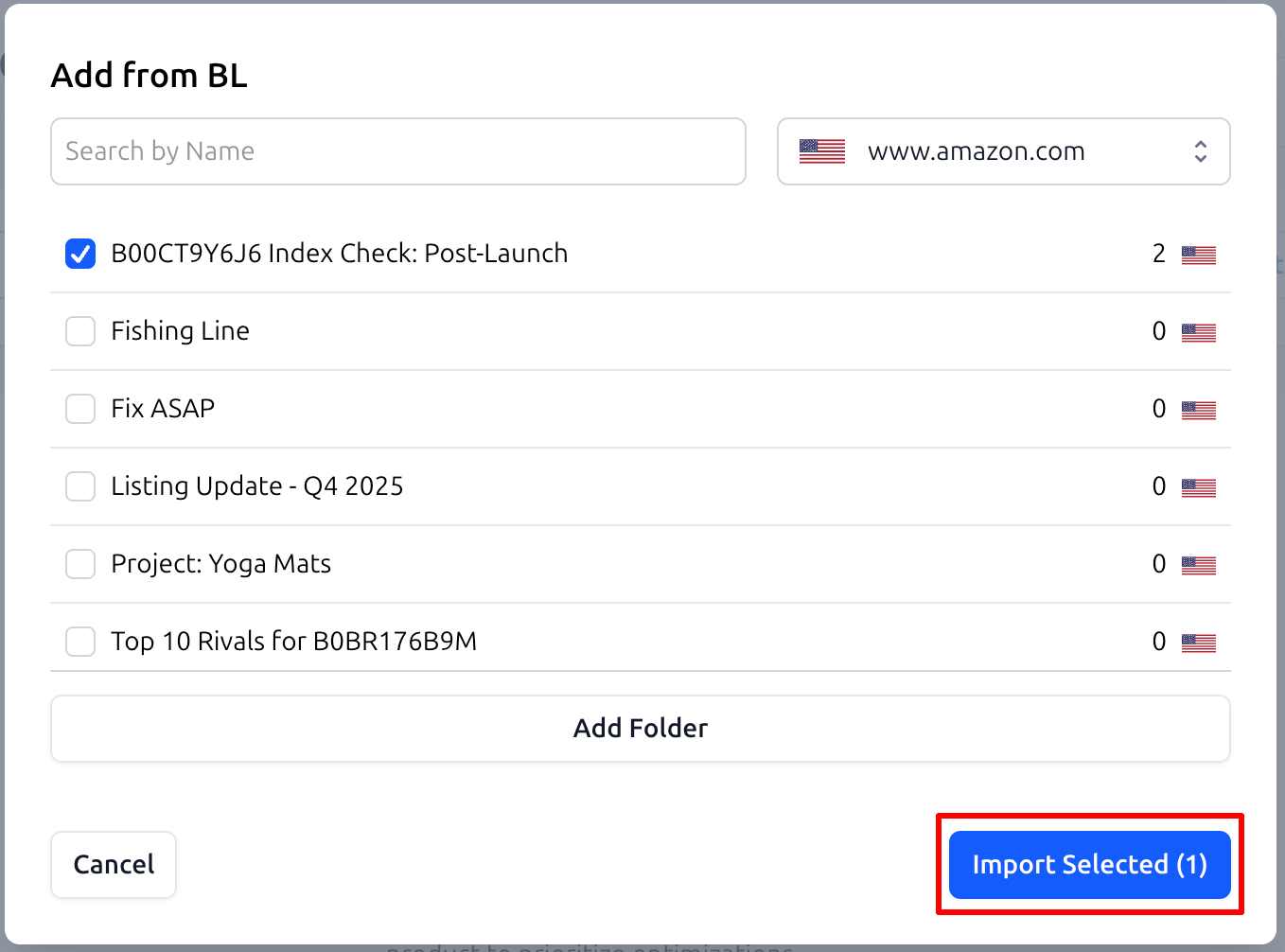
A modal titled Add from BL will appear. This interface allows you to:
Search by Name: Quickly find a specific project folder.
Filter by Marketplace: Ensure you are analyzing data for the correct region (e.g., www.amazon.com).
Select Folders: View the number of items in each list and select the ones you need, such as
Top 10 Rivals for [ASIN]orProject: Yoga Mats.
Once selected, click Import Selected, and the Listing Analyzer will populate automatically, ready for you to hit Analyze Listing.
Practical Use Cases
1. Competitive Benchmarking at Scale
When you find a new niche, you likely save the top 10 competitors in a folder like Top 10 Rivals.
Workflow: Instead of analyzing them one by one, use the integration to import the entire folder into the Listing Analyzer instantly. This allows you to see how your metrics stack up against the best in the category in a single view.
2. Monitoring Your Own Portfolio
If you manage multiple brands, you can keep your own products organized in folders by category.
Workflow: Create a folder such as
Fix ASAPfor listings that need optimization. Periodically import this list into the Analyzer to track your progress and ensure your scores have moved from "Red" or "Orange" toward "Green."
3. Post-Launch Gap Analysis
After a product launch, you may have a folder of products that are currently outperforming you for your main keywords.
Workflow: Import your
B00CT9Y6J6 Index Check: Post-Launchfolder to identify exactly what visual or text elements your competitors are using to maintain their lead.
Summary
The Bright List and Listing Analyzer integration ensures that your competitive intelligence is always actionable. By connecting your "storage" to your "analytical engine," SoldScope helps you spend less time on logistics and more time on optimization.