Using Boost Mode: Real-Time Rank Tracking

Olivia Reyes
Objective: Learn how to use Boost Mode to track keyword rankings every 2 hours during critical business events like product launches or aggressive ad campaigns.
What is Boost Mode?
By default, SoldScope updates your keyword rankings once every 24 hours. This is sufficient for monitoring long-term trends and daily health.
Boost Mode is a special feature that accelerates this frequency. When enabled for a specific keyword, the system tracks its position every 2 hours.
When should you use it?
Because Boost Mode consumes more resources, it is designed for short-term, high-impact situations where "waiting for tomorrow" isn't an option.
Recommended Use Cases:
🚀 Product Launches: You just launched a new product and are driving heavy outside traffic. You need to know immediately if and where you are starting to index.
💰 PPC Blitz Campaigns: You significantly increased your ad bids or budget. Use Boost Mode to verify if your Sponsored Rank jumps to the top of the page within hours.
⚡ "Honey-Moon" Period: Closely monitoring rank changes during the initial 2-4 weeks of a listing's life to react instantly to drops.
How to Enable Boost Mode
You can activate Boost Mode individually for any keyword in your tracking list.
Navigate to your Product Group and open the Keywords tab.
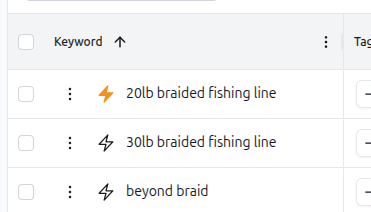
Locate the Lightning Bolt (⚡) icon next to the keyword you want to boost.
Click the icon. It will turn Orange, indicating that Boost Mode is active.
Understanding Limits & Duration
Boost Mode is a powerful tool, but it is resource-intensive. Here is how the limits work:
1. The 7-Day Timer
Boost Mode is temporary. Once activated, it runs for 7 days and then automatically turns off.
Why? Real-time tracking is rarely needed permanently. After a launch week or a specific campaign, the daily trend usually becomes the most important metric again. You can manually re-enable it if needed.
2. Usage Quotas (The "12x Factor")
Your account has a specific limit for "Boosted Keywords" (typically around 10% of your total keyword limit).
Why the limit? Checking a keyword every 2 hours requires 12 times more resources (server power, data processing, etc.) than a standard daily check.
Example: Tracking 1 keyword in Boost Mode costs the system roughly the same resources as tracking 12 standard keywords. Therefore, this is a premium resource reserved for your most critical terms.
Tip: You can check your current Boost usage in the top right corner of the Rank Tracker dashboard (e.g., "Boosts used: 5/50").
