Amazon New 75-Character Title Limit (Starts July 27)

Olivia Reyes
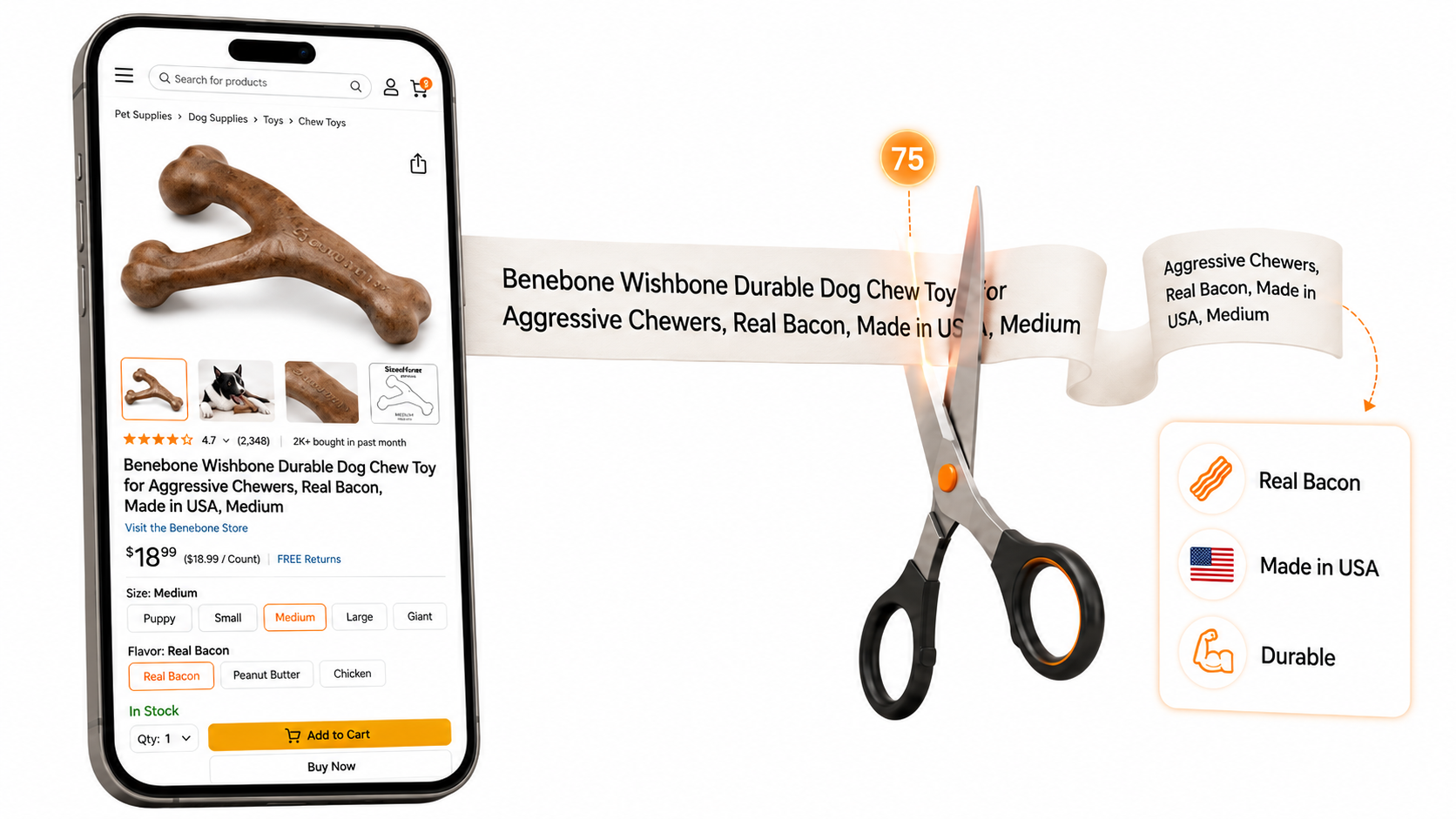
Sellers who have been on Amazon for a while have watched the platform inch toward shorter titles before. Style guides kept dropping the recommended length, and long titles quietly lost ground in search. What's different this time is the enforcement. Amazon isn't just nudging anymore, and it isn't simply cutting your title off at the display. After the deadline, anything still running long gets handed to Amazon's AI, which rewrites it for you.
Why Amazon is doing this
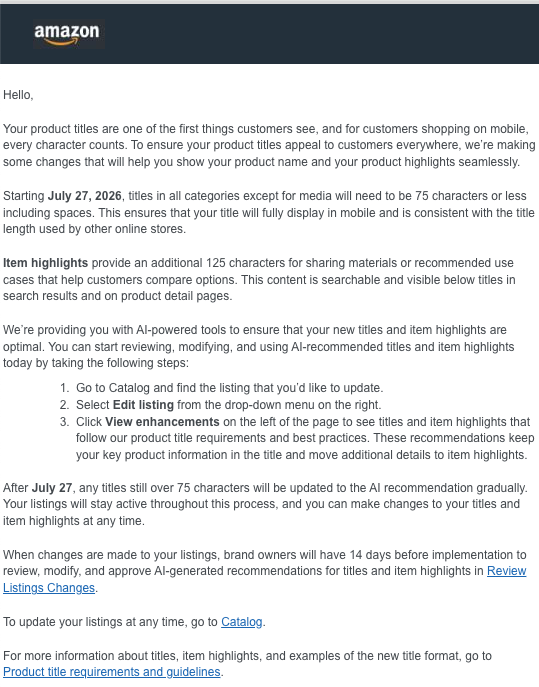
Read the email closely and the reasoning is right there: titles need to fully display on mobile. That's the whole story in four words.
Phones are where Amazon shopping happens now. The desktop browsing session, where a 200-character keyword string could stretch across two lines without much harm, is the exception rather than the rule. On a phone, a title that long gets clipped mid-word, and the half the shopper never sees was doing nothing for you anyway. Amazon also points out that a tighter title keeps your listing consistent with what shoppers see on other storefronts, which matters more as people price-check across apps in the same thirty seconds.
So this isn't really a title rule. It's a mobile rule wearing a title rule's clothing. Amazon is reshaping the product page around the screen most customers actually hold, and the title is just the first piece to move.
The trade-off: a new field called Item Highlights
Here's the part that softens the blow. Amazon isn't asking you to throw away the extra detail you have been packing into titles for years. It's giving you somewhere new to put it.
The new field is called Item Highlights, and it carries up to 125 characters of its own. Add that to the 75 in the title and you're back to roughly 200 characters to work with, a similar amount of room to what you had before, now divided into two fields that each do a more focused job. According to Amazon, Item Highlights is built for materials, recommended use cases, and the comparison details that help a shopper decide between two similar products. The content is searchable, and it shows up right alongside your title in both search results and on the detail page.
You'll find the field inside the listing editor, just under Item Name.
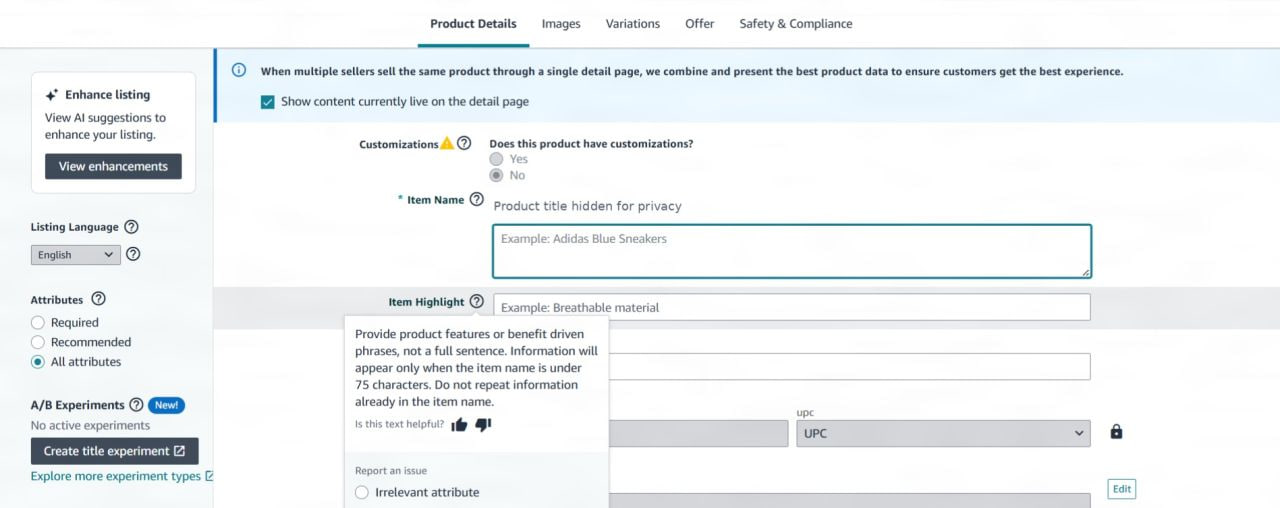
Amazon's own guidance for the field is worth reading literally. It asks for benefit-driven phrases rather than full sentences, and it flags two things sellers keep missing: the highlights only surface when the item name is under 75 characters, and you shouldn't repeat anything that's already in the title. In other words, Item Highlights isn't a place to dump leftovers. It's a second, distinct surface, and treating it like one is the difference between a clean listing and a redundant one.
What happens if you ignore the deadline
This is where it gets uncomfortable. If your title is still over 75 characters after July 27, Amazon updates it to its own AI-generated recommendation, gradually and without you lifting a finger. Your listings stay active the whole time, and you can still go in and change your titles and Item Highlights whenever you want. But the default, if you do nothing, is that Amazon decides what your title says.
That should bother you. Amazon's rewrite is optimized for broad relevance and a clean read, not for the specific keyword combination you tested and ranked for over months. It tends to lean on generic category terms, and it can shift your brand name or drop a variant detail in ways that quietly cost you placement. The title is one of the highest-weight ranking signals on your page. Letting an algorithm guess at it is not a strategy.
Brand-registered sellers get a little more breathing room. When changes are queued for your listings, you'll have 14 days to review, modify, and approve the AI's suggestions for both titles and Item Highlights before they go live, inside the Review Listings Changes section. Use that window. It's the safety net, not the plan.
What to do before July 27
You don't need a complicated system. You need to get to your titles before Amazon does.
Find every title over 75 characters. A flat-file export and a quick character count will flag them, or SoldScope's Listing Analyzer can scan your catalog and surface the listings at risk in one pass. Either way, sort by revenue and fix your top sellers first, since those are the listings where a bad rewrite hurts most.
Decide what earns a spot in the title. You have room for your brand, your main keyword, one real differentiator, and a size or variant. That's about it. Lead with the terms that actually convert, not the ones with the biggest impression counts.
Move everything else into Item Highlights and your backend search terms. The keywords you pull out of the title don't disappear; they get redistributed. Item Highlights gives the strongest of them a visible home, and backend terms catch the long tail.
Check your variation families. Parent and child titles both have to comply. Fixing the children while the parent runs long is an easy thing to miss and an easy thing for Amazon to rewrite.
Amazon also surfaces its own AI recommendations if you want a reference point. Go to Catalog, find the listing, choose Edit listing from the drop-down on the right, and click View enhancements on the left. Treat those as a starting point to react to, not a verdict to accept. And if you'd rather not rewrite every listing by hand, SoldScope's AI Listing Builder drafts a compliant 75-character title and matching Item Highlights from your own keywords and positioning, so the version that goes live is yours rather than Amazon's.
For the full rules, category exceptions, and Amazon's own formatting examples, the page to bookmark is Amazon's product title requirements and guidelines.
The takeaway
It's tempting to read this as a chore: shorten some titles, tick a box, move on. The sellers who come out ahead will be the ones who read it as what it actually is, which is Amazon committing fully to the phone and reorganizing the most valuable text on your listing around it. Seventy-five characters is plenty once you've done the work of knowing which words earn their place. Get there yourself, on your terms, before the deadline does it for you.