Amazon Says Item Highlights Will Move Below the Title on Desktop From August 10

Ivan Talpa
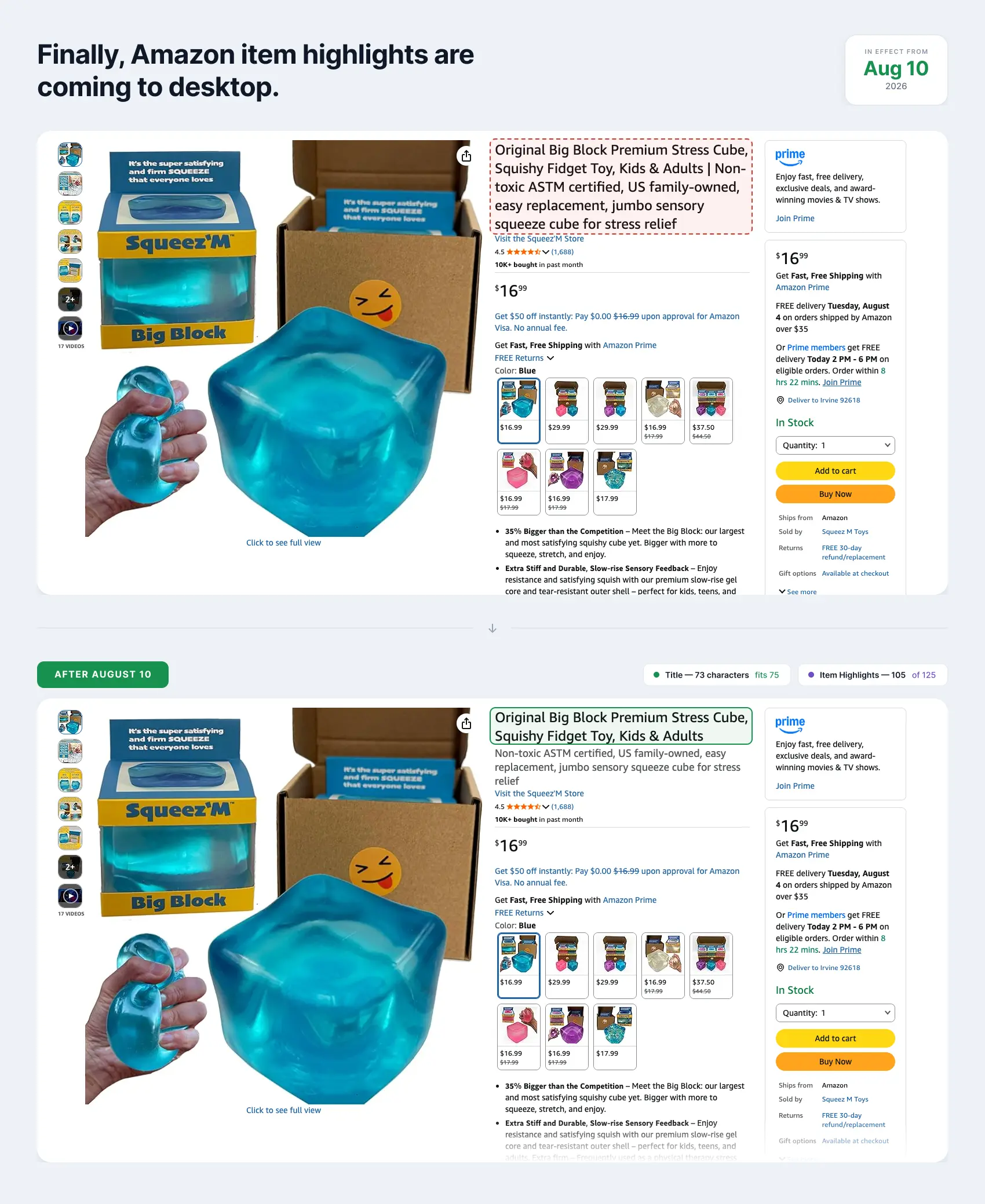
Table of contents
Open one of your updated listings on a phone, then on a laptop. The photos, the price and the reviews are identical. The only thing that changes is the title block. On mobile the Item Highlights sit on their own line below the title in grey. On desktop they are still glued to the end of the title with a vertical bar between them, same font and same size, so it reads as one long title like before.
Now Amazon says that from August 10, 2026 Item Highlights will display below the Item name on desktop as well as mobile.
One scope note before the detail: this article looks at Amazon.com. Amazon has not said whether the display change reaches every store on the same day, so timing may differ by marketplace.
Amazon tests everything, and this is no exception
For a company its size, Amazon moves oddly fast. There are always hundreds of experiments running on the site, and a layout change almost never arrives as one clean flip of a switch.
This one is behaving the same way. On listings that already have both fields, the same ASIN comes back in the new stacked layout on one page load and the old glued layout on the next. So if you and a colleague open the same listing and describe two different layouts, you are both right. One screenshot tells you nothing about your catalog.
Timeline
When | What happened |
|---|---|
Early June | Amazon announces the 75 character cap for every category except media, effective July 27, plus a new Item Highlights field worth 125 searchable characters. Total stays near 200. |
Through June | Editing opens. You can shorten the title and write Item Highlights yourself, or open View enhancements, review Amazon's AI version of both fields and apply it. The split layout starts appearing on mobile, but only on listings that were edited or where the AI version was applied. Untouched listings look exactly as before. |
July 1 | Amazon documents the structure for developers in an SP-API changelog post: |
July 27 | The 75 character requirement takes effect. Amazon begins gradually applying AI generated updates to titles that remain over the limit. |
From August 10 | According to Amazon, Item Highlights should display below the Item name on desktop as well as mobile. |
That last row is a plan, not a fact. The date has not arrived, and going by how the desktop test is running, expect this to appear in waves rather than everywhere at once.
The July 27 row explains what you have probably seen yourself. Open a batch of ASINs on your phone today and plenty still show one long title with no grey line under it. Nothing is broken. Amazon's developer note is blunt about why: an existing listing is not touched until someone submits an update, and integrations can move at their own pace through 2026. In the seller post Amazon puts the count at more than 984 million titles updated since June, without a denominator or a marketplace breakdown, so read that as a sign of movement rather than a measure of how far the migration has got.
Two things get mixed up here. One is whether a listing carries the two field structure at all. The other is how Amazon displays those two fields once it does. The August 10 statement appears to be about display. It does not spell out what happens that day to listings still running the legacy single title, so treat those as unfinished business rather than as exempt.
What our mobile tests showed: roughly 30 to 40 visible characters
Mobile search results changed along the way, and this is the part with money attached.
An old style listing shows the opening stretch of the title and nothing else. On listings that carry both fields we saw two lines instead: the title, then a grey line with the start of the Item Highlights, trailing off into an ellipsis somewhere around 30 to 40 characters in.
That is an observed range from our own checks, not a limit Amazon publishes. How much survives depends on screen width, app versus mobile browser, font size, language, badges on the card and whether the placement is organic or sponsored. Test it on your own listings and your own devices before you build rules around it.
The practical point holds either way. The opening words of that field are what a shopper reads before deciding whether to tap. Amazon says the complete field is searchable, but it has not published how the text is indexed or how it feeds ranking, so do not assume the tail end is pulling the same weight as the front.
If you work with the API
In the modular title structure the two fields are item_name and title_differentiation. Amazon documented the new attribute in its July 1 SP-API update and exposes the applicable schema through the Product Type Definitions API. Note the dependency: title_differentiation only works when item_name is 75 characters or fewer.
If you build listing workflows, start submitting the two as separate attributes instead of pushing one long string into item_name. Existing listings stay untouched until you submit an update, which is exactly why the migration looks so uneven from the outside.
One caveat before you use the API as your source of truth. It shows you your own listing contribution. It does not tell you which contribution won in the catalog, what text a given shopper is being served, or which frontend experiment they landed in. And the Listings Items API is built around your own listings, so it is not a route for auditing what a competitor has done.
What to do now
Check which of your listings actually have the second field filled in. Open one in Seller Central and look at Item Highlights, or pull the Category Listings report if you want the whole catalog in one view. What the storefront shows you is not reliable while the tests are running.
Front load the opening words. They are the part that survives in mobile search. Lead with what sells your product: material, pack count, certification, size. Do not start with a phrase that only makes sense once you read to the end.
Write attributes, not sentences. Short comma separated phrases survive being cut off.
Do not repeat the title. Amazon says the same, and repeated words waste the line you get.
Fill the empty fields. A lot of catalogs shortened titles in July and never came back. SoldScope’s Listing Builder can use your best-performing keywords to draft a 75-character Item name and matching Item Highlights, then help you upload them to Seller Central. The Category Listings report is the quickest route for a batch: it arrives pre-filled, and the Item Highlights column sits next to Item name. Upload it back through List Your Products, then check the upload status and any listing issues instead of assuming the storefront has already changed.
Audit parent and child records both, where they apply. Keep child specific values out of a parent title. One color, one size or one pack count does not belong there unless it is true for every child.