Plans and Limits in Smart Alerts

Olivia Reyes
What is limited
Three things in Smart Alerts depend on your plan:
Monitored products — products with monitoring turned on, across all your seller accounts and marketplaces. Products with monitoring turned off do not count.
Recipients — email addresses, chat channels and webhooks together.
Notification settings.
Seller feedback, the Events feed and the export do not depend on the plan. Presets are not tied to the plan either, but each account can have up to 10 of them.
Where to see the usage
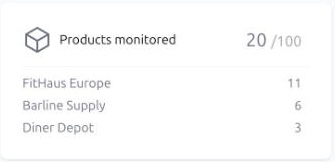
The Products monitored widget above the tabs shows the total against the limit, for example 20 / 100. With several seller accounts it also shows how many products each account has.
The Notifications tab shows X of Y for settings and for recipients.
When the limit for recipients, notification settings or presets is reached, the button for adding more is disabled, and a hint on it explains why. If you try to add more products than your plan allows, the products are not added and you see a message about the limit. Nothing is added silently over the limit.
Sharing the limit between accounts
Limits belong to your company, not to a single seller account. If you connect several seller accounts, they share the same pool of monitored products. The setup wizard splits the pool evenly between the accounts you select; later you can turn products on and off to rebalance.
If your company has several workspaces, recipients and notification settings are counted across all of them, while the counters on the Notifications tab show only the current workspace.
Changing plans
After an upgrade the new limits apply right away: add more products or recipients, nothing else changes.
After a downgrade nothing is deleted, but within a day the parts that no longer fit are put on hold:
Products over the new limit get monitoring turned off, starting with the ones added earliest. Their settings and event history stay.
Recipients over the new limit are paused, starting with the most recently added ones.
Notification settings over the new limit are switched off, starting with the most recently created ones.
You can choose what stays on, but only within the new limit: to turn on a product, resume a recipient or switch a setting back on, first turn off another one.
To change your plan, open Subscription and Billing in the user menu.