Seller Feedback: Tracking Your Store Ratings

Olivia Reyes
Product reviews vs. seller feedback
Amazon has two separate ratings. Product reviews rate a listing and are tracked on the Products tab as Rating and Review count. Seller feedback rates your store: shipping speed, packaging, communication. It affects the Buy Box and account health, and a single one-star rating can be worth a quick appeal or a message to the buyer. The Seller Feedback tab is about the second kind.
The marketplace cards
Pick a seller account in the selector, and you get one card per marketplace it sells on. Each card shows:
The marketplace and a See on Amazon link to your seller page.
A toggle to monitor feedback on this marketplace. New cards start with monitoring off. The Enable all marketplaces button in the toolbar switches every card on at once; when all of them are on, it turns into Disable all marketplaces.
The share of positive ratings, that is four and five stars, over the lifetime of the store, and the total number of ratings.
A table with the number of ratings per star count for the last 30, 90 and 365 days and for the lifetime of the store, plus the percentage of positive ratings for each period.
An importance selector next to each star count.
A card with no ratings yet says No feedback yet.
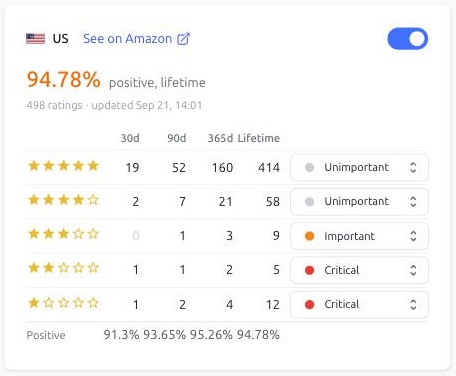
Importance by star count
When the number of ratings with a given star count changes, Smart Alerts records an event named after it: One-star feedback, Two-star feedback and so on up to five stars. Two new five-star ratings that arrive together make one event, and a rating that was removed also shows up as a change.
The importance you set next to a star count is the importance of those events, and it decides whether a notification setting will send them. The default is one and two stars Critical, three stars Important, four and five stars Unimportant, so that praise is recorded but never wakes anyone up.
The importance applies to the marketplace card you change it on. Different marketplaces can have different settings.
Note: right after you turn monitoring on, Smart Alerts first records the current numbers. Events start from the next change.
What an event contains
A feedback event in the Events feed shows how the rating count changed, for example 64 → 66, and the text of the new ratings with the buyer's name and date, when Amazon provides them. Emails and chat messages include the text of the new ratings as well, so you can judge the situation without opening Seller Central.
Limits
Seller feedback does not use the product limit of your plan. The product limit counts only products with monitoring turned on; feedback is tracked per marketplace on this tab.